If your company has had the same website for several years, you may eventually start thinking about redesigning it.
Maybe the design looks outdated. Maybe the website feels slow. Maybe your services have changed, but the website still presents the old version of your business.
But there is an important question to answer before starting a redesign project:
Does your website actually need a redesign, or does it simply need a few improvements?
A website can look old and still work perfectly well for the business. On the other hand, a website can look modern while creating serious problems with user experience, performance, SEO, or conversions.
That is why a website redesign should not start with:
“Let’s make the website look better.”
It should start with:
“What isn’t working anymore, and what does the business need the website to achieve?”
In this guide, we’ll look at 10 signs that your company website may need a redesign, and how to decide whether you need simple improvements, a complete redesign, or even a full rebuild.
First: Does Every Old Website Need a Redesign?
No.
The age of a website by itself is not enough to justify rebuilding it.
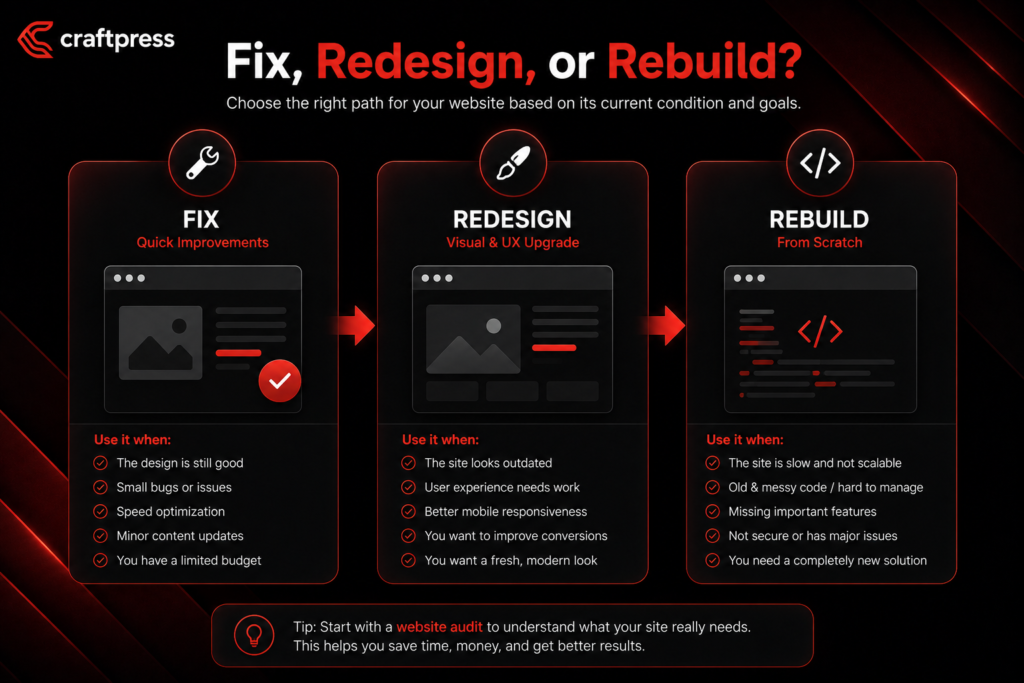
There are usually three different situations.
1. Your website needs improvements
Your website may still have a suitable structure and technology, but specific areas need attention.
For example:
- Some pages need better layouts.
- The mobile experience needs improvement.
- Images need updating.
- Calls to action are unclear.
- Some content is outdated.
- Certain sections are difficult to use.
In this situation, targeted improvements may be enough.
2. Your website needs a redesign
A redesign becomes more reasonable when the problems are broader and involve things such as:
- User experience.
- Navigation.
- Page structure.
- Visual identity.
- Content organization.
- Calls to action.
- Conversion experience.
The underlying technology may still be usable, but the website needs to be reconsidered as a whole.
3. Your website needs a rebuild
Sometimes the problem goes beyond design.
Your current website may not be able to support the functionality your business now needs. The CMS may be unsuitable, the architecture may be difficult to extend, or the existing implementation may create technical limitations.
In that case, rebuilding the website — potentially using a different technology — may make more sense than redesigning the existing system.
The goal is not to rebuild simply because the website is old. The goal is to choose the solution that actually addresses the problem.
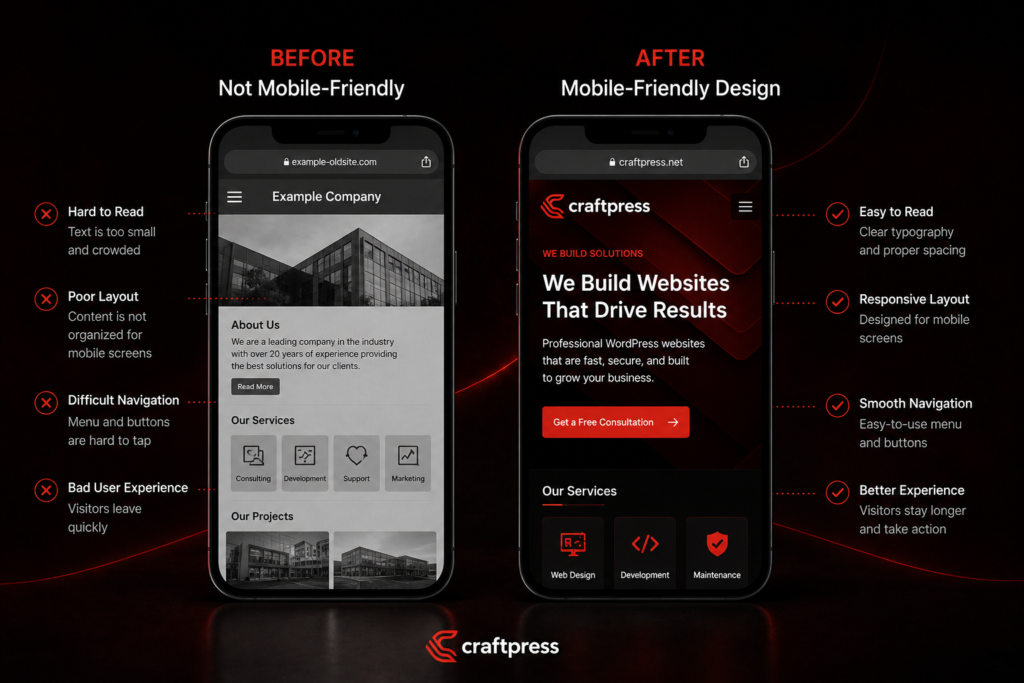
1. Your Website Does Not Work Well on Mobile
One of the first things you should check is how your website actually performs on mobile devices.
Don’t just ask:
“Does the website open on my phone?”
Ask:
- Is the text easy to read?
- Are buttons easy to tap?
- Is the navigation simple?
- Do images fit the screen properly?
- Are there elements extending beyond the screen?
- Are forms easy to complete?
- Does the page require unnecessary zooming?
- Is the overall experience comfortable?
A website technically being “mobile responsive” does not automatically mean it provides a good mobile experience.
Your customers may interact with your company primarily through their phones, so mobile usability needs to be considered from the beginning of a redesign rather than treated as a final adjustment.
Practical tip
Ask someone who has never used your website to complete a simple task on their phone, such as:
“Find our main service and tell me how you would contact the company.”
Watch what they do without helping them.
If they struggle to find information or complete the action, you may have a usability problem worth addressing.
2. Visitors Cannot Understand What Your Company Does Quickly
Imagine someone visits your website for the first time.
Can they quickly understand:
- What your company does?
- Who you serve?
- What problem you solve?
- What makes your business relevant to them?
- What should they do next?
If the answer is unclear, the problem may not be your visual design.
It could be your messaging and information architecture.
Many older company websites contain plenty of information but fail to communicate the most important information clearly.
The homepage may begin with a generic statement about being a “leading company” without immediately explaining what the business actually offers.
Practical tip
Ask someone unfamiliar with your company to visit the homepage.
Give them a short amount of time to look at it, then ask:
“What does this company do?”
If they cannot answer confidently, your redesign should address the messaging and structure — not just the colors and typography.
3. The Design No Longer Represents the Level of Your Company
Businesses change.
A company that started small may eventually:
- Add new services.
- Enter new markets.
- Change its brand identity.
- Work with larger clients.
- Expand its team.
- Add new products.
- Position itself differently in the market.
But the website may still represent the company as it was years ago.
This creates a gap between the real business and its digital presence.
Your website is often one of the first places potential customers go when evaluating your company.
If the company has evolved significantly but the website has not, a redesign can be an opportunity to bring the digital experience in line with the current brand.
Practical tip
Ask yourself:
“Does our website represent the company we are today, or the company we were several years ago?”
If the answer is the second one, it may be time to reconsider the website.
4. Your Website Navigation Has Become Complicated
A website should help visitors find information, not make them search for it.
Look at your navigation and ask:
- Can visitors easily find your services?
- Is your About page easy to locate?
- Can users find your projects or case studies?
- Is your contact information obvious?
- Are there too many menu items?
- Are important pages buried several clicks deep?
- Are similar pages organized logically?
As businesses grow, websites often accumulate pages without anyone reconsidering how those pages fit together.
The result can be a navigation structure that made sense years ago but no longer makes sense today.
Practical tip
Start with the questions your customers actually want answered.
Then organize your website around those needs instead of simply listing everything the company wants to say.
5. Your Website Is Slow or Provides a Poor User Experience
A website can have an attractive design and still provide a frustrating experience.
Slow loading pages, heavy images, unnecessary scripts, and poor mobile performance can all affect how users interact with the website.
You can use tools such as Google PageSpeed Insights and Core Web Vitals to investigate important aspects of page experience. Google describes Core Web Vitals around areas including loading performance, responsiveness, and visual stability.
However, there is an important distinction:
A redesign does not automatically make a website faster.
If the new website is filled with large images, unnecessary animations, excessive scripts, or poorly optimized resources, the redesign can actually make performance worse.
Practical tip
Make performance a requirement from the beginning of the project.
Don’t wait until the website is finished to ask:
“Can we make it faster?”
6. Your Content and Services No Longer Reflect the Business
This is one of the most common problems with older company websites.
The business changes, but the website doesn’t.
You may find:
- Services you no longer provide.
- Missing services.
- Outdated company information.
- Old team members.
- Old contact information.
- Outdated product descriptions.
- Content that no longer reflects your positioning.
A new visual design will not solve outdated content.
You can have a beautiful website with completely outdated information.
Practical tip
Before redesigning the website, perform a basic content audit.
Classify existing content into:
Keep → Update → Remove → Create
This gives the redesign a much stronger foundation.
7. Your Calls to Action Are Not Clear
A visitor reaches the end of your service page.
What happens next?
Do they know what you want them to do?
Depending on the business, the desired action could be:
- Request a quote.
- Book a consultation.
- Contact the company.
- Request a demo.
- Book an appointment.
- Start an order.
- Register.
- Make an inquiry.
There is no universal CTA that works for every business.
But important pages should generally make the next step clear.
If visitors have to figure out what to do after reading your content, there may be a conversion problem.
Practical tip
For every important page, ask:
“What is the next action we want this visitor to take?”
If you cannot answer that clearly, the page may need to be reconsidered.
8. Your Website Is Difficult to Update
Sometimes the problem isn’t obvious to visitors.
It is obvious to your team.
Every time someone needs to add:
- A new service.
- A new page.
- A case study.
- A blog article.
- A new team member.
- A new section.
Someone has to call a developer for a simple content change.
If the website’s CMS or implementation does not match the way your business operates, that can become a long-term problem.
Practical tip
Think about who will manage the website after launch.
If your marketing team needs to publish content regularly, the website should be built around that workflow.
And this does not automatically mean that WordPress is the right answer.
The appropriate CMS or technology should depend on the project’s requirements, functionality, scalability, integrations, budget, and maintenance needs.
9. Your Website Cannot Support Your New Business Goals
This can be one of the strongest reasons to reconsider your website.
Imagine that your company originally needed a simple corporate website.
Now you want to:
- Generate leads.
- Accept bookings.
- Sell products.
- Offer online courses.
- Connect the website to a CRM.
- Accept payments.
- Add membership functionality.
- Connect external systems.
- Create customer dashboards.
- Build custom workflows.
Your current website may have been designed for a completely different business model.
At this point, the question is not simply:
“Can we add another feature?”
It becomes:
“Can the current architecture support where the business is going?”
Practical tip
Before redesigning, create a list of your current business goals and the capabilities you expect the website to need in the near future.
Then evaluate whether your existing website can realistically support them.
If it cannot, a rebuild — or even a different technology — may be more appropriate.
10. Your Analytics Show That Something Is Wrong
This is where you can move beyond assumptions and start using actual data.
Depending on your analytics setup, you may discover that:
- Important pages receive traffic but generate little interaction.
- Mobile users behave differently from desktop users.
- Visitors leave at a particular step.
- Important pages are difficult to reach.
- A CTA receives little engagement.
- Organic traffic reaches the website but does not generate meaningful actions.
But be careful.
A poor metric does not automatically mean you need a complete redesign.
The underlying problem could be:
- Content.
- Offer.
- CTA.
- Performance.
- Tracking.
- Audience targeting.
- One specific page.
Practical tip
Use data to identify the problem before deciding on the solution.
Don’t start with:
“The website isn’t converting, let’s rebuild everything.”
Start with:
“Where exactly is the problem, and what is causing it?”
Should You Improve Your Existing Website or Redesign It?
This is one of the most important decisions to make before spending money.
Consider targeted improvements if:
- The website’s technical foundation is still suitable.
- The structure works.
- Most content is usable.
- Problems are limited to specific pages or elements.
- There are no major new functionality requirements.
Consider a redesign if:
- The user experience needs significant improvement.
- The visual identity no longer represents the company.
- Navigation needs restructuring.
- Content needs to be reorganized.
- Conversion paths need improvement.
- The website feels disconnected from the current brand.
Consider a rebuild if:
- The current architecture is limiting the business.
- Major functionality needs to be added.
- The current CMS is no longer appropriate.
- Complex integrations are required.
- The website needs to scale differently.
- The current technology creates significant limitations.
The important point is:
You don’t need to start from zero simply because your website is old.
A proper assessment can sometimes save you significant time and money.
Can a Website Redesign Hurt SEO?
Yes.
A redesign can create SEO problems if it is treated as a purely visual project.
Problems can occur when you change:
- URLs.
- Page structure.
- Content.
- Internal links.
- Metadata.
- Canonical configuration.
without planning how those changes affect search engines.
If URLs change, Google recommends mapping old URLs to their new equivalents, implementing appropriate permanent redirects, updating internal links and sitemaps, testing the migration, and monitoring the website after launch.
You should also avoid redirecting every old URL to the homepage simply because it is convenient. Each old URL should ideally point to the most relevant corresponding new page when one exists.
Practical tip
Before launching a redesign, create:
Current URLs → New URLs → Redirect Plan
Pay particular attention to pages that already have:
- Organic traffic.
- Search rankings.
- Backlinks.
- Leads.
- Significant business value.
A redesign should improve the website without unnecessarily throwing away the SEO value the old website has already built.
What Should You Review Before Starting a Website Redesign?
Before telling a development company:
“Let’s start.”
Review the current website.
1. Existing pages
What pages currently exist?
2. URLs
Which URLs receive organic traffic or rankings?
3. Organic traffic
Which pages are important from search?
4. Conversions
Which pages generate leads or other valuable actions?
5. Backlinks
Are there important external links pointing to specific pages?
6. Analytics
Where are users struggling?
7. Content
What should be kept, updated, removed, or created?
8. Technical setup
Is the current CMS and architecture still appropriate?
9. Business requirements
What does the company need the new website to accomplish?
10. Future growth
What functionality or capabilities might the business need next?
This assessment helps you avoid making a common mistake:
redesigning the website based on appearance while ignoring the reasons it stopped working for the business.
A Website Redesign Is More Than Changing the Design
This is probably the most important idea in the entire process.
A successful redesign is not simply:
New Colors + New Fonts + New Homepage
It should be closer to:
Business Goals → User Needs → Content → Structure → UX → Design → Technology → SEO → Performance → Conversion
If you only change the visual design, you may end up with a website that looks better.
But if you use the redesign to solve actual business and user problems, you can end up with a website that works better for the business.
That is a much more valuable outcome.
Do You Have to Use the Same Technology?
Not necessarily.
If your current website uses WordPress, that does not automatically mean the new website must use WordPress.
And if your current website is custom-built, that does not automatically mean custom development is the best solution for the next version.
The technology decision should come after understanding:
- Business requirements.
- Features.
- Budget.
- Scalability.
- Integrations.
- Maintenance.
- Long-term goals.
For some projects, WordPress may be an excellent fit.
For others, Shopify, a dedicated LMS, or custom development may make more sense.
The technology should serve the project — not force the project to adapt to the technology.
Website Redesign Checklist
Before deciding whether your company needs a redesign, ask:
- Does the website provide a good mobile experience?
- Can visitors understand what the company does quickly?
- Does the design represent the current brand?
- Is the navigation clear?
- Is the website performing well?
- Is the content up to date?
- Are the CTAs clear?
- Is the website easy to update?
- Does it support the company’s current business goals?
- Can it support the company’s expected growth?
- Do analytics reveal meaningful user experience or conversion problems?
Answering “no” to one or two questions does not automatically mean you need a redesign.
But if several fundamental areas are no longer working, the website deserves a deeper assessment.
Final Thoughts
Your company website does not need to be the newest or most visually impressive website on the internet.
It needs to be appropriate for your business, clear to your customers, easy to use, performant, and capable of supporting your goals.
If the problem is a few outdated sections, targeted improvements may be enough.
If the problem involves the user experience, structure, content, and visual identity, a redesign may be the right approach.
And if the current technical foundation is preventing the business from moving forward, you may need a rebuild or a different technology altogether.
The most important question is not:
“What should our new website look like?”
Start with:
“What problems is our current website failing to solve, and what do we need the new website to achieve?”
If you already have a company website and you’re unsure whether it needs a redesign, improvement, or complete rebuild, you can contact CraftPress and share your current website and business requirements. The right starting point is understanding the current situation and defining the appropriate solution — not assuming that rebuilding everything is always the answer.
FAQ
Does every old website need a redesign?
No. A website’s age alone does not determine whether it needs a redesign. The decision should be based on performance, usability, content, technology, business requirements, and overall effectiveness.
How often should a company redesign its website?
There is no universal timeframe. A website should be evaluated based on whether it still supports the company’s goals and provides a good experience rather than simply being redesigned after a fixed number of years.
What is the difference between a website redesign and a rebuild?
A redesign usually focuses on improving the website’s structure, UX, content organization, and visual experience. A rebuild may involve replacing or significantly restructuring the underlying technical implementation.
Can a website redesign hurt SEO?
Yes. Changes to URLs, content, site structure, and internal links can create SEO issues if they are not planned correctly. URL mapping, appropriate redirects, and post-launch monitoring are important when URLs change.
Does a new website have to use WordPress?
No. The right technology depends on the project’s requirements, functionality, integrations, scalability, budget, and maintenance needs.
Can I improve my existing website instead of redesigning it?
Yes. If the problems are limited to specific pages, content, performance issues, or design elements, targeted improvements may be more appropriate than a complete redesign.
What should I check before redesigning my company website?
Review your existing pages, URLs, organic traffic, conversions, backlinks, analytics, content, technical setup, business requirements, and expected future needs.
CTA
Not sure whether your company website needs a redesign, improvements, or a complete rebuild?
Don’t start by choosing a technology or asking for a new design.
Start by understanding what’s actually wrong with the current website and what the business needs from the next version.
Share your current website and project requirements with CraftPress, and let’s determine the right approach for your business.