When a business owner says, “We need a new website,” that statement can mean very different things.
Maybe the current website looks outdated and no longer represents the company properly.
Maybe the navigation is confusing, the mobile experience is poor, or visitors cannot easily find the information they need.
But sometimes the problem goes much deeper.
The current technology may be limiting the business. The codebase may be difficult to maintain. Important integrations may be unreliable. Or the website may simply be unable to support the functionality the company needs today.
In other cases, the problem may be much smaller: a few pages need improvement, the calls to action are weak, or the homepage is not converting visitors effectively.
That leads to an important question:
Does your business need a website refresh, a redesign, or a complete rebuild?
These are not interchangeable terms.
Choosing the wrong approach can mean spending money on a project that doesn’t actually solve the underlying problem.
At the same time, a business may spend heavily on a complete rebuild when a targeted redesign would have been enough.
So before deciding what the new website should look like or which technology should power it, start with a more important question:
What is actually wrong with the current website?
What Is a Website Redesign?
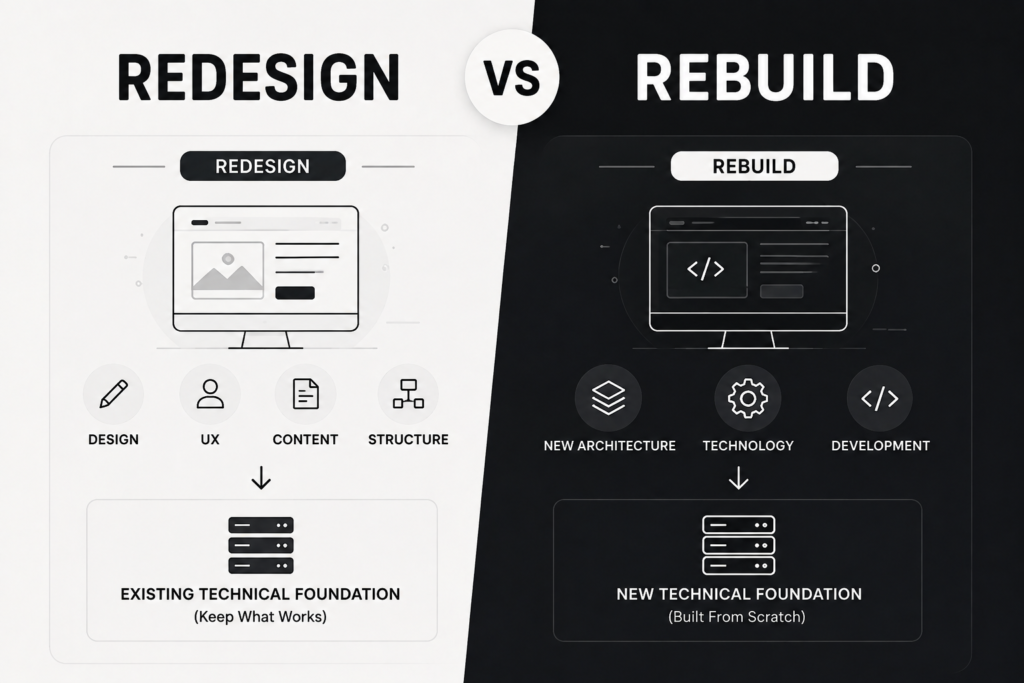
A website redesign primarily focuses on improving the experience users have with the website.
This can include:
- Visual design.
- Page layouts.
- Navigation.
- Typography.
- Colors.
- User experience.
- Content structure.
- Calls to action.
- Mobile experience.
- Customer journey.
A redesign does not necessarily require changing the website’s underlying technology.
For example, if your website is built on WordPress and WordPress is still suitable for your business requirements, you may be able to redesign the website, improve the UX, restructure the content, and optimize the conversion journey without replacing the entire technical platform.
The idea is simple:
Keep a suitable foundation → improve the experience.
This makes sense when the main problems are related to design, UX, content structure, or conversion, rather than the technology itself.
What Is a Website Rebuild?
A website rebuild goes much deeper.
Instead of primarily changing what users see, you may also replace or significantly change the technical foundation underneath the website.
A rebuild can involve:
- Changing the CMS.
- Changing the framework.
- Rebuilding the architecture.
- Restructuring the database.
- Replacing integrations.
- Rebuilding custom functionality.
- Changing how content is managed.
- Rebuilding backend components.
- Changing the architecture responsible for performance.
An important distinction is that:
A redesign and a rebuild do not necessarily have to happen together.
You can rebuild the technical foundation while keeping much of the existing visual identity.
You can also completely redesign the user experience while keeping the same technology.
In other words, there are two separate questions:
What should the user experience look like?
And:
What should the website be built on?
There Is Also a Third Option: Website Refresh
Many businesses assume there are only two choices:
Redesign or Rebuild.
But there is another option that is often overlooked:
Website Refresh
A refresh means making targeted improvements to the existing website without completely redesigning or rebuilding it.
For example:
- Updating the homepage.
- Improving service pages.
- Replacing outdated images.
- Improving mobile usability.
- Strengthening calls to action.
- Updating content.
- Improving the speed of specific pages.
- Adding trust signals.
- Fixing specific UX problems.
The website remains fundamentally the same, but the most important problems are addressed.
Sometimes, this is actually the smartest business decision.
Not every old website needs to be rebuilt.
The Real Difference: Where Is the Problem?
Instead of asking:
“Should we redesign or rebuild?”
Start by asking:
“Where is the actual problem?”
If the problem is mainly visual or user-experience related:
You probably need a redesign.
If the problem is mainly technical or architectural:
You probably need a rebuild.
If the problems are limited to a few specific areas:
You may only need targeted improvements.
And if both the experience and the technical foundation have major problems:
You may need a redesign and rebuild.
This is one of the simplest frameworks you can use before making the decision.
When Is a Website Redesign the Better Choice?
1. Your website no longer represents your brand
Your company has evolved, but your website hasn’t.
Maybe you have:
- Updated your branding.
- Added new services.
- Started targeting different customers.
- Entered new markets.
- Changed your positioning.
But the website still communicates the company as it was several years ago.
A redesign can bring the digital experience in line with the business you have today.
2. The user experience is confusing
Your technology may be perfectly suitable, but users struggle to navigate the website.
For example:
- Navigation is unclear.
- Services are difficult to find.
- Important information is buried.
- Calls to action are unclear.
- Mobile layouts are difficult to use.
- Information is organized poorly.
In this situation, rebuilding the entire website simply because the UX needs improvement may be unnecessary.
A well-planned redesign could solve the real problem.
3. Your website gets traffic but not enough leads
This is especially important for businesses.
If your website receives visitors but those visitors aren’t becoming leads or customers, the problem may be related to:
- Messaging.
- Calls to action.
- Page structure.
- Trust signals.
- Offer presentation.
- User journey.
- Forms.
- Conversion paths.
Before saying:
“We need a new website.”
Ask:
“Is the technology actually the problem, or is the website failing to convert visitors?”
If the existing technical foundation can support the necessary improvements, a redesign combined with conversion optimization may be enough.
4. Your content structure has become outdated
As a company grows, its website content usually grows with it.
At first, you may only have:
- About.
- Services.
- Contact.
Later, you may have:
- Multiple services.
- Industries.
- Case studies.
- Resources.
- Blog content.
- Landing pages.
- Products.
- Locations.
The problem may no longer be the amount of content, but how that content is organized.
A redesign can improve the website’s information architecture and make it easier for users to find what they need.
If the website already has valuable organic traffic and indexed URLs, SEO should be considered before changing the structure or URLs. Google recommends planning URL changes carefully, including mapping old URLs to new ones, implementing appropriate redirects, and updating relevant site signals during a site move. Google Search Central — Site Moves with URL Changes
When Is a Website Rebuild the Better Choice?
This is different.
A rebuild becomes more appropriate when the foundation itself has become a problem.
1. Your current technology is limiting the business
Imagine your company now needs:
- Customer portals.
- Advanced dashboards.
- Complex booking.
- Custom workflows.
- Multiple integrations.
- Learning platforms.
- Advanced e-commerce functionality.
- Custom user roles.
- Integration with internal systems.
But the current technology cannot support these requirements effectively.
Continuously adding one feature after another can turn into a collection of temporary solutions built on top of an unsuitable foundation.
The better question becomes:
“What technical foundation can support where the business is going next?”
Not:
“How can we add one more feature to the old website?”
2. The codebase has become difficult to maintain
Sometimes the problem isn’t visible to customers.
Developers see it immediately.
A small change can break something else.
A new feature requires changes in multiple areas.
Different developers have implemented different parts using different approaches.
Documentation is incomplete.
Dependencies are outdated.
Maintenance becomes increasingly expensive.
In that situation, changing the design doesn’t solve the underlying problem.
The business may need to reconsider the technical foundation itself.
3. The current CMS is no longer appropriate
Just because a business started with a particular platform doesn’t mean that platform will always be the right choice.
Business requirements change.
You may eventually need:
- Different workflows.
- More complex permissions.
- Different content management processes.
- New integrations.
- User accounts.
- Advanced data management.
The question should not be:
“What is the most popular CMS?”
Instead:
“What architecture actually fits our requirements?”
4. Performance problems are connected to the architecture
Not every performance problem requires a rebuild.
Performance can often be improved through:
- Image optimization.
- Caching.
- CDN configuration.
- Code optimization.
- Removing unnecessary scripts.
- Better hosting.
- Improving how resources are loaded.
But if serious performance problems are deeply connected to the architecture, the underlying system may need to be reconsidered.
Don’t rebuild a website simply because it is slow.
First ask:
Why is it slow?
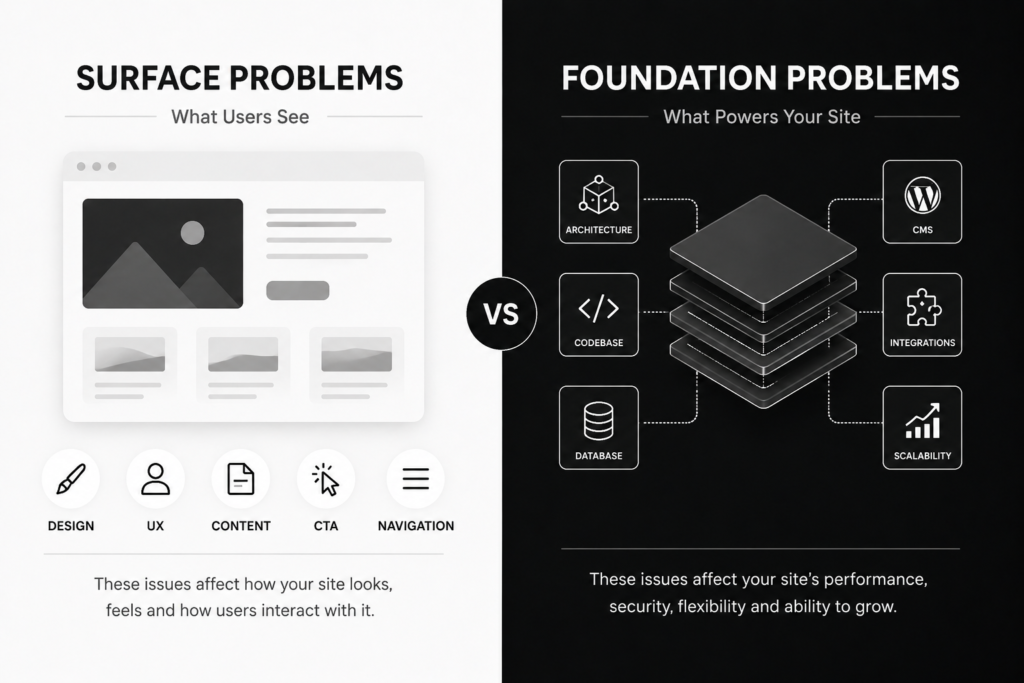
website-redesign-vs-rebuild-problems.webp
When Should You Simply Improve the Existing Website?
This is the option many businesses overlook.
If:
- The CMS is suitable.
- The architecture is healthy.
- The codebase is maintainable.
- The website performs its core functions.
- Business requirements have not changed dramatically.
- Problems are limited to specific areas.
Then targeted improvements may be the better decision.
For example, the website may work well, but:
- The homepage messaging is weak.
- Service pages need improvement.
- Calls to action are unclear.
- Mobile UX needs work.
You probably don’t need a complete rebuild.
A better approach may be:
Identify the problem → Fix the problem → Measure the result.
So, Which One Should You Choose?
Use this simple decision framework.
If the foundation is healthy but the experience is outdated:
Redesign.
If the experience is acceptable but the foundation is limiting the business:
Rebuild.
If the problems are specific and limited:
Targeted improvements.
If both the experience and foundation have major problems:
Redesign + Rebuild.
This isn’t an absolute rule, but it gives you a practical starting point.
What If You Need Both a Redesign and a Rebuild?
This is common in larger projects.
You may discover that:
- The design is outdated.
- Navigation needs restructuring.
- Content needs reorganizing.
- The CMS is limiting.
- Integrations need to be replaced.
- Performance requires deeper technical changes.
In that situation, the project may look more like:
Business Requirements
↓
Information Architecture
↓
UX
↓
Content
↓
Design
↓
Technology Selection
↓
Development
↓
SEO Migration
↓
Performance
↓
Conversion Optimization
The important thing is not to think of the project as:
“We’re just making the website look new.”
You’re actually improving or replacing an important part of the company’s digital infrastructure.
Don’t Choose the Technology Before Defining the Requirements
This is one of the most important points for any business planning a new website.
A common mistake is starting with:
“Should we use WordPress?”
Or:
“Should we build it custom?”
Those are technical questions that come too early.
The first question should be:
“What does the business actually need the website to do?”
Then evaluate:
- Required features.
- Integrations.
- Content volume.
- Scalability.
- Security requirements.
- Performance.
- Budget.
- Maintenance.
- Internal team capabilities.
- Future business requirements.
Only then should you choose the technology.
For example, WordPress can be an excellent choice for many corporate websites and content-driven businesses.
But a project with complex workflows or highly specialized functionality may justify custom development.
An e-commerce business may be better suited to WooCommerce in one situation and Shopify in another.
There is no universally “best” technology.
There is only the technology that fits the project.
If you’re comparing the two approaches, read our guide to WordPress vs. Custom Development before making the decision.
What About SEO?
SEO should influence the decision, but it shouldn’t be the only factor.
If your current website has:
- Organic traffic.
- Search rankings.
- Backlinks.
- Important pages.
- Valuable content.
- Leads coming from Google.
All of those assets need to be considered before making major changes.
A redesign does not automatically preserve SEO.
A rebuild does not automatically destroy it.
The outcome depends heavily on how the change is planned and implemented.
If URLs are changing, you need a clear URL mapping strategy, appropriate redirects, updated internal links, correct canonical signals, and an updated sitemap. You should also monitor the website through Google Search Console after launch. Google Search Central — Site Moves with URL Changes
Google also notes that significant site changes can cause temporary ranking fluctuations while Google recrawls and reindexes the new site. Google Search Central — Site Moves with URL Changes
If you’re specifically concerned about protecting organic visibility during a redesign, read our guide on how to redesign a website without losing SEO.
How Does the Decision Affect Your Budget?
It can have a major impact, but there is no single price that applies to every project.
A refresh, redesign, and rebuild are not simply three different price levels for the same service.
They involve different amounts of:
- Design.
- Development.
- UX work.
- Content work.
- Technical planning.
- Migration.
- Testing.
- Quality assurance.
- Project management.
That’s why you shouldn’t compare proposals simply by asking:
“Which company is cheaper?”
First make sure you’re comparing the same scope.
A proposal for redesigning an existing website on the same platform is not necessarily comparable to a project involving:
- New architecture.
- Custom development.
- Multiple integrations.
- Data migration.
- SEO migration.
- New backend functionality.
For more context on what affects website development pricing, read our guide to website development cost.
Don’t Let a Cheap Redesign Become an Expensive Rebuild
This is one of the biggest risks.
Imagine your business has a serious technical problem.
Instead of rebuilding the foundation, you choose a redesign because it is cheaper.
The website gets a new visual layer.
But underneath, you still have:
- The same architecture.
- The same technical limitations.
- The same maintenance problems.
- The same difficulty adding features.
- The same performance issues.
Six months later, you discover that you still need a rebuild.
Now you’ve effectively paid for two projects.
The opposite mistake is possible too.
You may have a perfectly healthy technical foundation, but the design and UX are outdated.
If you rebuild everything unnecessarily, you may spend significantly more money and time without solving a problem that actually required a redesign.
The cheapest project initially isn’t always the cheapest business decision in the long term.
10 Questions to Ask Before Approving a New Website Project
Before choosing a development company or approving a proposal, ask:
1. What exactly is wrong with our current website?
Not:
“It’s old.”
You need a specific diagnosis.
2. Can the current technology support our requirements?
If not, ask:
Why?
3. What exactly will change?
Ask for a clear scope.
4. What will remain?
This is just as important.
5. Are our URLs changing?
If they are:
What is the migration plan?
6. What will happen to our existing SEO?
Ask about:
- Rankings.
- Traffic.
- Content.
- Redirects.
- Internal links.
7. What will happen to our integrations?
Especially:
- CRM.
- Payments.
- Booking.
- Analytics.
- Email.
- ERP.
- Internal systems.
8. Who will maintain the website after launch?
A website doesn’t stop being a business asset when it launches.
9. Can the new architecture support future growth?
You don’t want to solve today’s problem only to create the same problem again next year.
10. Why are you recommending a redesign instead of a rebuild?
Or the other way around.
This may be the most important question of all.
A good development partner should be able to explain the reasoning behind the recommendation, not simply sell you a particular technology or service.
A Practical Example: Two Companies, Two Different Decisions
Imagine two companies.
Company One
The company has a five-year-old website.
The website:
- Loads reasonably well.
- Uses a suitable CMS.
- Has stable integrations.
- Receives organic traffic.
- Has a reasonable content structure.
But:
- The design looks outdated.
- The homepage messaging is weak.
- Mobile UX needs improvement.
- Service pages are difficult to navigate.
- Calls to action are inconsistent.
Does this company need a rebuild?
Probably not.
A strong redesign may solve the actual problems.
Company Two
Now imagine another company whose website:
- Uses an outdated system.
- Has a difficult-to-maintain codebase.
- Cannot easily integrate with its current CRM.
- Needs user accounts.
- Needs dashboards.
- Requires custom workflows.
- Has architecture-related performance problems.
- Requires developer involvement for almost every significant change.
Changing the colors and typography won’t solve the problem.
This company should seriously consider a:
Rebuild.
And if the user experience is also outdated, the project may require a redesign at the same time.
Diagnosis Should Come Before Technology
One of the biggest mistakes is starting the project with:
WordPress or Custom Development?
Before answering:
What are we actually trying to solve?
A better process is:
Business
↓
Users
↓
Requirements
↓
Content
↓
UX
↓
Performance
↓
SEO
↓
Technology
↓
Development
This allows the technology to serve the business requirements instead of forcing the business into a technology decision that was made too early.
If your existing website already needs a redesign, our guide on redesigning a website without losing SEO can help you understand the migration side of the project.
Final Thoughts
A Website Refresh, Website Redesign, and Website Rebuild are three different approaches.
A refresh is suitable when you have specific problems that can be solved without major structural changes.
A redesign makes sense when the existing technology is still appropriate, but the design, UX, structure, or conversion experience no longer supports the business.
A rebuild becomes more appropriate when the technical foundation itself is limiting the company.
And sometimes the right answer is both:
Redesign + Rebuild.
But the right decision shouldn’t be based purely on how old the website looks.
It shouldn’t be based on whichever technology is currently popular.
And it shouldn’t be based solely on the cheapest proposal.
Start with:
What is the actual business problem?
Then ask:
What is the most appropriate solution to that problem?
If your website is an important source of marketing, leads, and organic traffic, you also need to consider the SEO value you’ve already built before making major changes to the site.
Ultimately, the goal of a new website isn’t simply to make it look better than the old one.
The goal is to make it:
Better for users, better for the business, technically appropriate, scalable, and capable of producing real business results.
If you’re not sure whether your business needs a website refresh, redesign, or rebuild, start with a proper assessment of the current website and your business requirements before choosing the solution.
Explore CraftPress web development services or contact CraftPress about your website project.
Frequently Asked Questions
What is the difference between a website redesign and a website rebuild?
A website redesign mainly focuses on the visual design, user experience, structure, and presentation of the website. A rebuild goes deeper and may involve changing the architecture, CMS, codebase, integrations, or other parts of the technical foundation.
Is a website redesign cheaper than a rebuild?
It can be, but there is no fixed rule. The cost depends on the project’s scope, technology, functionality, integrations, content, and technical requirements.
When should a business redesign its website?
A redesign can make sense when the existing technology is still suitable but the design, UX, content structure, or conversion experience no longer supports the business effectively.
When should a business rebuild its website?
A rebuild may be appropriate when the technical foundation is limiting the business, difficult to maintain, unsuitable for new requirements, or unable to support the functionality the company needs.
Can I redesign my website without changing the technology?
Yes. If the current technical foundation is suitable, you can redesign the website’s visual experience, UX, structure, and content while keeping the existing platform.
Does a website rebuild always require a new design?
No. A technical rebuild can be performed while keeping much of the existing visual design if that design is still appropriate for the business.
Should I use WordPress or custom development?
There is no universal answer. The decision should be based on the project’s functionality, integrations, scalability, content management needs, budget, maintenance requirements, and long-term business goals.
Can a redesign or rebuild affect SEO?
Yes. Changes to URLs, content, site structure, redirects, and technical configuration can affect organic visibility. SEO migration should therefore be planned before development and launch.
Not sure whether your business needs a website refresh, redesign, or complete rebuild?
Don’t choose based on how old your website looks or which technology happens to be popular.
Let CraftPress help you identify the actual problems, evaluate your requirements, and determine the right technical and strategic approach for your business.