You may have a professional-looking website.
The design is polished, the images look great, the website works on mobile, and you have dedicated pages for most of your services.
And yet…
You aren’t getting enough leads.
You have visitors, but very few calls.
People visit your website and leave.
Your contact forms aren’t getting enough submissions.
Maybe you’re spending money on Google Ads or SEO, but the website itself isn’t turning that traffic into real business opportunities.
So you start asking:
Why isn’t my business website generating leads?
The first thing you need to understand is that the problem isn’t necessarily that you need a new website.
The problem could be your messaging.
Your user experience.
Your calls to action.
Your trust signals.
Your website performance.
The quality of your traffic.
Or simply the fact that you aren’t properly measuring conversions.
In this guide, we’ll look at 10 common reasons a business website can receive traffic without generating enough leads—and, more importantly, how to diagnose the problem before spending money on a completely new website.
First Question: Is Traffic Really the Problem?
This is the first mistake you need to avoid.
When a website doesn’t generate enough leads, the first reaction is usually:
“We need more traffic.”
But more traffic isn’t always the answer.
Imagine your website receives 10,000 visits from people who aren’t actually interested in the service you provide.
You could double the traffic and still have poor results.
Meanwhile, another website might receive fewer visitors but attract people with real buying intent and generate significantly more leads.
So before saying:
“We need more SEO.”
or:
“We need more ads.”
ask:
Are the people visiting the website actually the people I want to sell to?
This is the difference between a:
Traffic Problem
and a:
Conversion Problem.
1. Your Website Isn’t Clear About What You Actually Offer
One of the biggest reasons websites struggle to convert is that visitors don’t immediately understand:
What do you offer?
Who is it for?
Why should they choose you?
A visitor shouldn’t have to read five pages just to figure out what your company actually does.
Especially if they arrived from an advertisement or a Google search.
The first section of the page should answer some basic questions quickly:
- What does the company offer?
- Who is the service for?
- What value does the customer get?
- What should the visitor do next?
For example, instead of:
“We create digital experiences that transform businesses.”
you could use something much more specific:
“We design and develop websites for businesses that help you showcase your services, generate leads, and grow online.”
The point isn’t that one sentence is universally better than another.
The point is that the message needs to be clear to the right audience.
If visitors don’t understand what you do, many of them won’t stay long enough to figure it out.
2. There Is No Clear CTA
A visitor may like your website and even become interested in your service, but eventually they may ask:
What am I supposed to do now?
If your website doesn’t answer that question clearly, you’re leaving the next step entirely to the visitor.
Your CTA could be:
- Request a Quote.
- Book a Consultation.
- Contact Us.
- Request a Website Audit.
- Start Your Project.
- Talk to Our Team.
The right CTA depends on your business model and the customer’s stage in the buying journey.
Not every button needs to say:
“Buy Now.”
If you’re selling a relatively high-value B2B service, a customer may need:
Request a Consultation
or:
Discuss Your Project
before they’re ready to buy.
The important thing is for the CTA to be:
Clear + Relevant + Easy to Complete.
3. Your Website Looks Good but Isn’t Designed to Convert
This is an important distinction.
You can build a beautiful website that still performs poorly from a business perspective.
A lead-generation website needs to think about:
Attention → Interest → Trust → Action
First, you capture attention.
Then you explain the solution.
Then you build trust.
Then you ask the visitor to take a clear action.
If the website simply follows:
Hero
↓
About
↓
Services
↓
Gallery
↓
Footer
without creating a logical customer journey, it can look excellent while still underperforming commercially.
4. Your Visitors Don’t Have Enough Reasons to Trust You
Before someone contacts a company for the first time, they naturally ask:
Why should I choose you?
This becomes even more important when the service is expensive or the decision involves significant risk.
You can use trust signals such as:
- Previous projects.
- Case studies.
- Genuine testimonials.
- Genuine reviews.
- Relevant certifications or partnerships, if they actually exist.
- Clear company information.
- A transparent process.
- Real examples of your work.
But there’s an important rule:
Don’t use trust signals simply because they look good.
If you have three genuine testimonials, use them.
Don’t create 25 fake reviews.
If you have real projects, show them.
A strong portfolio is often more convincing than generic claims such as:
“We are the best digital agency.”
You can use CraftPress projects to demonstrate real work and build credibility instead of relying only on marketing claims.
5. Your Service Pages Are Too Weak
Your homepage might be excellent, but then the visitor clicks on a service page and finds:
Web Design
followed by a very generic paragraph.
That’s not enough.
A strong service page should help the visitor understand:
What is the service?
Explain it clearly.
Who is it for?
Identify the businesses or customers who can benefit from it.
What do they get?
Explain the deliverables or expected outcomes.
Why do they need it?
Explain the problem it solves.
Why should they choose you?
Explain your differentiation.
What happens next?
Provide a clear CTA.
A service page isn’t simply an informational page.
It can be one of the most important pages in your entire website when it comes to converting visitors into leads.
That’s why having clear CraftPress services is an important part of the customer journey.
6. Your Website Is Too Slow
Performance isn’t just a technical issue.
It’s part of the user experience.
If the page takes too long to load, visitors may leave before they even see your offer.
That makes performance optimization part of the overall website experience—not simply a developer task.
But don’t oversimplify the problem:
“The website is slow = rebuild it.”
Not necessarily.
The problem could be caused by:
- Large images.
- Too many scripts.
- Unnecessary plugins.
- Poor hosting.
- Caching issues.
- CSS or JavaScript files.
- Third-party services.
- The way resources are loaded.
If your website has performance problems, the better approach is to diagnose the cause first instead of assuming that a complete rebuild is necessary.
Google recommends paying attention to Core Web Vitals and overall page experience, while also emphasizing that page experience involves more than just a few technical metrics. Google Search Central — Page Experience
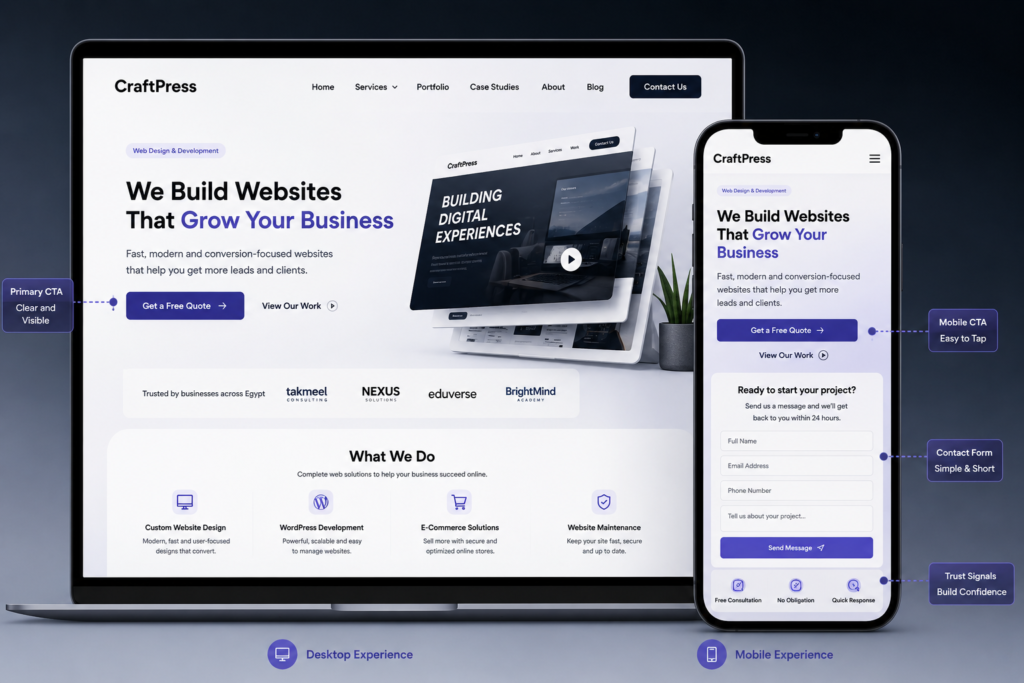
7. Your Mobile Experience Is Poor
This can be a serious problem, especially if a significant portion of your traffic comes from mobile devices.
Your website may look excellent on desktop, but on a phone:
- Text may be too small.
- Buttons may be too close together.
- The menu may be difficult to use.
- Images may be oversized.
- Forms may be difficult to complete.
- CTAs may be difficult to find.
- The page may require excessive scrolling.
The problem is that a business owner may review the website on a desktop and think:
“The website looks great.”
But the customer could be experiencing something completely different.
Review your most important pages on an actual mobile device, especially:
- Homepage.
- Service pages.
- Contact page.
- Landing pages.
- Checkout pages, if you have an e-commerce website.
8. Your Contact Form Is Too Complicated
Sometimes you do everything right.
The visitor is interested.
They understand your services.
They see your case studies.
They trust you.
They reach the CTA.
They click:
Contact Us
And then they see a form asking for:
- Name.
- Email.
- Phone.
- Company.
- Job title.
- Company size.
- Budget.
- Service.
- How they found you.
- A long message.
- And 17 additional questions.
So they leave.
Just because you need more information doesn’t mean you have to request everything in the first step.
Start with the information you genuinely need.
If your business requires more qualification, you can use:
- Multi-step forms.
- Qualification after submission.
- Follow-up calls.
- CRM workflows.
The principle is simple:
Reduce friction at the first step.
9. You Aren’t Properly Tracking Conversions
This is one of the most dangerous problems because it can leave you completely unaware of what’s actually happening.
You might say:
“Our website doesn’t generate leads.”
But are you measuring:
- Form submissions?
- WhatsApp clicks?
- Phone clicks?
- Email clicks?
- Quote requests?
- Bookings?
- Downloads?
- Signups?
In Google Analytics, important interactions can be measured as Key Events, allowing you to understand which user actions matter to your business and how different channels contribute to them. Google explains that an Event can be marked as a Key Event when it represents an important action for business success. Google Analytics — Key Events
For lead-generation websites, Google also provides a recommended generate_lead event for measuring when someone submits a request or lead form. Google Analytics — Generate Lead Event
So before saying:
“The website isn’t generating customers.”
ask:
Can I actually measure the customer journey from the first visit to the lead?
10. You’re Attracting the Wrong Traffic
This is one of the most important reasons.
You can invest heavily in:
- SEO.
- Google Ads.
- Social media.
- Content marketing.
and generate thousands of visitors.
But if the audience is wrong, conversions will remain poor.
For example, if you provide website development services to businesses but most of your traffic comes from people searching for:
Free Website Templates
you generated traffic.
But you didn’t necessarily generate potential customers.
That’s why traffic analysis should include:
- Who is visiting?
- Where are they coming from?
- What are they searching for?
- Which page did they land on?
- What did they do afterward?
- Does this traffic actually match your offer?
The problem isn’t always:
“We need more traffic.”
It may be:
“We need more relevant traffic.”
📷 Image Placement
Image idea: A funnel showing:
Traffic
↓
Relevant Visitors
↓
Engaged Visitors
↓
Leads
↓
Qualified Leads
↓
Customers
Highlight the fact that increasing traffic at the top of the funnel doesn’t automatically increase customers at the bottom.
Alt Text:Website traffic funnel showing the path from visitors to qualified leads and customers
Suggested file name:website-traffic-to-leads-funnel.webp
So How Do You Find the Real Problem?
Instead of immediately changing the website, diagnose it in this order.
Step 1: Review Your Traffic
Look at:
- Number of visits.
- Traffic sources.
- Landing pages.
- Search queries.
- Audience.
If the traffic itself isn’t relevant, conversion optimization alone won’t solve the problem.
Step 2: Review User Behavior
Use analytics and behavior analysis tools to understand:
- Where people enter.
- Where they go.
- Where they leave.
- What they click.
- Whether they reach the CTA.
- Whether they start the form.
- Whether they complete it.
Data is more useful than guessing.
Step 3: Review Your Messaging
Open your homepage and service pages and ask:
“If someone sees this website for the first time, will they understand within seconds what we offer and who it’s for?”
If the answer is:
“Not really.”
start there.
Step 4: Review Your CTAs
Does every important page have a clear next step?
Or does the visitor have to figure it out themselves?
Step 5: Review Your Trust Signals
Do you have:
- Projects?
- Reviews?
- Case studies?
- Testimonials?
- Clear information about the company?
And only use information that is genuine and verifiable.
Step 6: Review Technical Performance
Check:
- Mobile experience.
- Speed.
- Core Web Vitals.
- Errors.
- Forms.
- Broken links.
- Tracking.
Step 7: Review Conversion Tracking
Before making major changes, make sure you know:
What is actually converting?
And:
What isn’t?
Does This Mean You Need a New Website?
Not necessarily.
And this is one of the most important points in the entire article.
If the problem is:
- Messaging.
- CTAs.
- Forms.
- Content.
- Trust.
- Tracking.
you may be able to solve a significant part of the problem without rebuilding the website.
If the problem involves:
- Architecture.
- Technology.
- Integrations.
- Scalability.
- Performance caused by the underlying technical structure.
then you may need deeper development work.
If the main problem is design, UX, or information architecture, a redesign may be the right solution.
That’s why the decision between:
Refresh vs. Redesign vs. Rebuild
should come after diagnosis, not before.
If you’re considering a redesign or rebuild, read our guide on Website Redesign vs. Rebuild to understand when each option makes sense.
7 Things to Check Before Paying for a New Website
If your website isn’t producing results, run through this checklist first.
1. Is the homepage clear?
Does the visitor immediately understand what you offer?
2. Is the CTA clear?
Does the visitor know what to do next?
3. Are your service pages convincing?
Do they explain the problem, solution, and value?
4. Do you have real trust signals?
Not generic claims, but actual evidence.
5. Is the website fast and mobile-friendly?
Especially your most important conversion pages.
6. Are your forms easy to complete?
Or are you asking for too much information?
7. Are you actually measuring leads?
If you have no proper tracking, you’re trying to fix something you can’t see.
A Website With 5,000 Visits vs. One With 1,000 Visits
Let’s imagine two websites.
Website A
5,000 visits
But the traffic isn’t relevant.
The CTA is weak.
The forms are complicated.
Trust signals are limited.
Website B
1,000 visits
But:
- The audience is relevant.
- The message is clear.
- Service pages are strong.
- The CTA is clear.
- Tracking is properly configured.
- The customer journey is better.
Which one is better?
Traffic volume alone doesn’t answer the question.
What matters to the business is:
How many real business opportunities are being generated by the website?
That’s why you need to distinguish between:
Traffic Metrics
and
Business Metrics.
A Good Website Isn’t Just a Source of Traffic
This is an important mindset shift for business owners.
Your website isn’t simply:
“We’re online.”
It should be part of your marketing and sales system.
Think of it as:
Search / Ads / Social
↓
Website
↓
Value Proposition
↓
Trust
↓
CTA
↓
Lead
↓
Sales Process
If one part of this chain is weak, the website may appear to be “not generating customers” even though the real problem exists somewhere else.
When Do You Actually Need a Redesign?
You may want to consider a redesign if:
- The design looks outdated.
- The UX is poor.
- The information architecture is confusing.
- The mobile experience is weak.
- CTAs aren’t positioned logically.
- The content structure needs to be reorganized.
But if the underlying technology is appropriate, you don’t necessarily need to start from zero.
If you’re considering a new website, you can also review website design cost to understand the factors that affect project cost.
When Is the Problem Actually the Technology?
If you have:
- Features you can’t implement.
- Complex integrations.
- Architecture problems.
- An outdated system.
- Scalability limitations.
- Performance problems caused by the underlying architecture.
then the question may be:
“Does this website need technical redevelopment?”
rather than:
“Does this website need a new design?”
And you shouldn’t choose a technology simply because it’s popular.
The choice between WordPress, WooCommerce, Shopify, custom development, or another solution should be based on the actual requirements of the project.
You can read our guide on WordPress vs. Custom Development if you want to compare the two approaches.
When Is the Problem Actually SEO?
If traffic is very low, you may have problems with:
- Keyword targeting.
- Content.
- Search intent.
- Technical SEO.
- Internal linking.
- Indexing.
- Authority.
In that case, changing the design won’t automatically solve your organic traffic problem.
A website can look excellent while still failing to rank for the searches that matter to the business.
That’s why you need to distinguish between:
No Relevant Traffic
and
Traffic But No Leads.
These are two different problems.
📷 Image Placement
Image idea: A split funnel showing:
Low Traffic Problem
SEO → Content → Search Intent → Visibility
versus:
Low Conversion Problem
Messaging → UX → Trust → CTA → Form → Lead
Alt Text:Difference between low website traffic and poor visitor-to-lead conversion
Suggested file name:traffic-vs-conversion-problem.webp
The Bottom Line
If your business website isn’t generating enough leads, don’t immediately start building a new website.
Start with diagnosis.
Ask:
Do I have enough traffic?
Then:
Is that traffic relevant?
Then:
Is the website clear?
Then:
Do visitors trust the business?
Then:
Is there a clear CTA?
Then:
Is the conversion journey easy?
Then:
Is the website fast and mobile-friendly?
Then:
Am I actually measuring leads and Key Events?
Only after that can you determine whether you need:
Small Improvements
or
Conversion Optimization
or
SEO
or
Performance Optimization
or
Redesign
or
Rebuild.
Because the problem isn’t always:
“The website is bad.”
And sometimes it isn’t even:
“The website needs to look better.”
The real problem may simply be that the website wasn’t designed to turn visitors into business opportunities in the first place.
And that’s a very different problem.
If you already have a website and aren’t sure whether the issue is design, SEO, performance, UX, or conversion, talk to CraftPress about your website before investing in a complete rebuild.
Frequently Asked Questions
Why isn’t my business website generating leads even though it gets traffic?
The problem may not be traffic volume. It could be the quality of the traffic, unclear messaging, weak CTAs, insufficient trust signals, poor UX, difficult forms, or inadequate conversion tracking.
Do I need a new website if my current website isn’t generating leads?
Not necessarily. The problem may be solved by improving messaging, CTAs, service pages, forms, tracking, or performance. The right solution depends on the diagnosis.
How do I know whether the problem is SEO or conversion?
If your website isn’t receiving enough relevant organic traffic, the problem may involve SEO, content, or search intent. If you’re receiving relevant traffic but very few leads, the problem may be conversion-related or connected to the user experience.
Does website speed affect lead generation?
Performance is part of the user experience, and slow websites can create friction. However, you shouldn’t assume that speed is the only reason for poor conversion. The entire customer journey should be analyzed.
What is the most important thing on a business website homepage?
The homepage should clearly communicate the company’s value to the right audience, explain the solution, build trust, and provide an obvious next step appropriate to the customer’s stage.
Is having many CTAs on a website a good thing?
Not necessarily. The important thing is that CTAs are clear and relevant to the context. Too many competing actions can confuse visitors instead of helping them.
What conversion should I track on a business website?
It depends on the business model. It could be a form submission, phone call, quote request, booking, or another action that represents real business value. Google Analytics allows important interactions to be defined and measured as Key Events. Google Analytics — Key Events
Does more website traffic automatically mean more customers?
No. More traffic does not guarantee more customers. Traffic quality, audience relevance, user experience, messaging, and the conversion journey all matter.
CTA
Your website gets traffic but isn’t generating enough leads?
Before investing in a completely new website, let’s identify the problem first.
Is it SEO?
UX?
Messaging?
Performance?
Conversion tracking?
Or does the website actually need a redesign or rebuild?
Talk to CraftPress and identify the real problem before investing in the solution.You may have a professional-looking website.
The design is polished, the images look great, the website works on mobile, and you have dedicated pages for most of your services.
And yet…
You aren’t getting enough leads.
You have visitors, but very few calls.
People visit your website and leave.
Your contact forms aren’t getting enough submissions.
Maybe you’re spending money on Google Ads or SEO, but the website itself isn’t turning that traffic into real business opportunities.
So you start asking:
Why isn’t my business website generating leads?
The first thing you need to understand is that the problem isn’t necessarily that you need a new website.
The problem could be your messaging.
Your user experience.
Your calls to action.
Your trust signals.
Your website performance.
The quality of your traffic.
Or simply the fact that you aren’t properly measuring conversions.
In this guide, we’ll look at 10 common reasons a business website can receive traffic without generating enough leads—and, more importantly, how to diagnose the problem before spending money on a completely new website.
First Question: Is Traffic Really the Problem?
This is the first mistake you need to avoid.
When a website doesn’t generate enough leads, the first reaction is usually:
“We need more traffic.”
But more traffic isn’t always the answer.
Imagine your website receives 10,000 visits from people who aren’t actually interested in the service you provide.
You could double the traffic and still have poor results.
Meanwhile, another website might receive fewer visitors but attract people with real buying intent and generate significantly more leads.
So before saying:
“We need more SEO.”
or:
“We need more ads.”
ask:
Are the people visiting the website actually the people I want to sell to?
This is the difference between a:
Traffic Problem
and a:
Conversion Problem.
1. Your Website Isn’t Clear About What You Actually Offer
One of the biggest reasons websites struggle to convert is that visitors don’t immediately understand:
What do you offer?
Who is it for?
Why should they choose you?
A visitor shouldn’t have to read five pages just to figure out what your company actually does.
Especially if they arrived from an advertisement or a Google search.
The first section of the page should answer some basic questions quickly:
- What does the company offer?
- Who is the service for?
- What value does the customer get?
- What should the visitor do next?
For example, instead of:
“We create digital experiences that transform businesses.”
you could use something much more specific:
“We design and develop websites for businesses that help you showcase your services, generate leads, and grow online.”
The point isn’t that one sentence is universally better than another.
The point is that the message needs to be clear to the right audience.
If visitors don’t understand what you do, many of them won’t stay long enough to figure it out.
📷 Image Placement
Image idea: Compare a weak Hero Section with a clear, customer-focused message.
Side one:
“We Build Digital Experiences.”
Side two:
“Web design and development for businesses that want to attract customers and grow online.”
Highlight the CTA in the second design.
Alt Text:Comparison between unclear and clear website messaging focused on the customer
Suggested file name:website-messaging-conversion.webp
2. There Is No Clear CTA
A visitor may like your website and even become interested in your service, but eventually they may ask:
What am I supposed to do now?
If your website doesn’t answer that question clearly, you’re leaving the next step entirely to the visitor.
Your CTA could be:
- Request a Quote.
- Book a Consultation.
- Contact Us.
- Request a Website Audit.
- Start Your Project.
- Talk to Our Team.
The right CTA depends on your business model and the customer’s stage in the buying journey.
Not every button needs to say:
“Buy Now.”
If you’re selling a relatively high-value B2B service, a customer may need:
Request a Consultation
or:
Discuss Your Project
before they’re ready to buy.
The important thing is for the CTA to be:
Clear + Relevant + Easy to Complete.
3. Your Website Looks Good but Isn’t Designed to Convert
This is an important distinction.
You can build a beautiful website that still performs poorly from a business perspective.
A lead-generation website needs to think about:
Attention → Interest → Trust → Action
First, you capture attention.
Then you explain the solution.
Then you build trust.
Then you ask the visitor to take a clear action.
If the website simply follows:
Hero
↓
About
↓
Services
↓
Gallery
↓
Footer
without creating a logical customer journey, it can look excellent while still underperforming commercially.
4. Your Visitors Don’t Have Enough Reasons to Trust You
Before someone contacts a company for the first time, they naturally ask:
Why should I choose you?
This becomes even more important when the service is expensive or the decision involves significant risk.
You can use trust signals such as:
- Previous projects.
- Case studies.
- Genuine testimonials.
- Genuine reviews.
- Relevant certifications or partnerships, if they actually exist.
- Clear company information.
- A transparent process.
- Real examples of your work.
But there’s an important rule:
Don’t use trust signals simply because they look good.
If you have three genuine testimonials, use them.
Don’t create 25 fake reviews.
If you have real projects, show them.
A strong portfolio is often more convincing than generic claims such as:
“We are the best digital agency.”
You can use CraftPress projects to demonstrate real work and build credibility instead of relying only on marketing claims.
📷 Image Placement
Image idea: Use a real CraftPress project screenshot together with a short project overview or case-study section.
Alt Text:Real website design and development project by CraftPress
Suggested file name:craftpress-real-website-project.webp
Use a real CraftPress project here instead of a stock image whenever possible.
5. Your Service Pages Are Too Weak
Your homepage might be excellent, but then the visitor clicks on a service page and finds:
Web Design
followed by a very generic paragraph.
That’s not enough.
A strong service page should help the visitor understand:
What is the service?
Explain it clearly.
Who is it for?
Identify the businesses or customers who can benefit from it.
What do they get?
Explain the deliverables or expected outcomes.
Why do they need it?
Explain the problem it solves.
Why should they choose you?
Explain your differentiation.
What happens next?
Provide a clear CTA.
A service page isn’t simply an informational page.
It can be one of the most important pages in your entire website when it comes to converting visitors into leads.
That’s why having clear CraftPress services is an important part of the customer journey.
6. Your Website Is Too Slow
Performance isn’t just a technical issue.
It’s part of the user experience.
If the page takes too long to load, visitors may leave before they even see your offer.
That makes performance optimization part of the overall website experience—not simply a developer task.
But don’t oversimplify the problem:
“The website is slow = rebuild it.”
Not necessarily.
The problem could be caused by:
- Large images.
- Too many scripts.
- Unnecessary plugins.
- Poor hosting.
- Caching issues.
- CSS or JavaScript files.
- Third-party services.
- The way resources are loaded.
If your website has performance problems, the better approach is to diagnose the cause first instead of assuming that a complete rebuild is necessary.
Google recommends paying attention to Core Web Vitals and overall page experience, while also emphasizing that page experience involves more than just a few technical metrics. Google Search Central — Page Experience
7. Your Mobile Experience Is Poor
This can be a serious problem, especially if a significant portion of your traffic comes from mobile devices.
Your website may look excellent on desktop, but on a phone:
- Text may be too small.
- Buttons may be too close together.
- The menu may be difficult to use.
- Images may be oversized.
- Forms may be difficult to complete.
- CTAs may be difficult to find.
- The page may require excessive scrolling.
The problem is that a business owner may review the website on a desktop and think:
“The website looks great.”
But the customer could be experiencing something completely different.
Review your most important pages on an actual mobile device, especially:
- Homepage.
- Service pages.
- Contact page.
- Landing pages.
- Checkout pages, if you have an e-commerce website.
📷 Image Placement
Image idea: Show the same website on desktop and mobile, highlighting the CTA and contact form on the mobile version.
Alt Text:Comparison of website experience on desktop and mobile
Suggested file name:website-mobile-conversion.webp
8. Your Contact Form Is Too Complicated
Sometimes you do everything right.
The visitor is interested.
They understand your services.
They see your case studies.
They trust you.
They reach the CTA.
They click:
Contact Us
And then they see a form asking for:
- Name.
- Email.
- Phone.
- Company.
- Job title.
- Company size.
- Budget.
- Service.
- How they found you.
- A long message.
- And 17 additional questions.
So they leave.
Just because you need more information doesn’t mean you have to request everything in the first step.
Start with the information you genuinely need.
If your business requires more qualification, you can use:
- Multi-step forms.
- Qualification after submission.
- Follow-up calls.
- CRM workflows.
The principle is simple:
Reduce friction at the first step.
9. You Aren’t Properly Tracking Conversions
This is one of the most dangerous problems because it can leave you completely unaware of what’s actually happening.
You might say:
“Our website doesn’t generate leads.”
But are you measuring:
- Form submissions?
- WhatsApp clicks?
- Phone clicks?
- Email clicks?
- Quote requests?
- Bookings?
- Downloads?
- Signups?
In Google Analytics, important interactions can be measured as Key Events, allowing you to understand which user actions matter to your business and how different channels contribute to them. Google explains that an Event can be marked as a Key Event when it represents an important action for business success. Google Analytics — Key Events
For lead-generation websites, Google also provides a recommended generate_lead event for measuring when someone submits a request or lead form. Google Analytics — Generate Lead Event
So before saying:
“The website isn’t generating customers.”
ask:
Can I actually measure the customer journey from the first visit to the lead?
10. You’re Attracting the Wrong Traffic
This is one of the most important reasons.
You can invest heavily in:
- SEO.
- Google Ads.
- Social media.
- Content marketing.
and generate thousands of visitors.
But if the audience is wrong, conversions will remain poor.
For example, if you provide website development services to businesses but most of your traffic comes from people searching for:
Free Website Templates
you generated traffic.
But you didn’t necessarily generate potential customers.
That’s why traffic analysis should include:
- Who is visiting?
- Where are they coming from?
- What are they searching for?
- Which page did they land on?
- What did they do afterward?
- Does this traffic actually match your offer?
The problem isn’t always:
“We need more traffic.”
It may be:
“We need more relevant traffic.”
📷 Image Placement
Image idea: A funnel showing:
Traffic
↓
Relevant Visitors
↓
Engaged Visitors
↓
Leads
↓
Qualified Leads
↓
Customers
Highlight the fact that increasing traffic at the top of the funnel doesn’t automatically increase customers at the bottom.
Alt Text:Website traffic funnel showing the path from visitors to qualified leads and customers
Suggested file name:website-traffic-to-leads-funnel.webp
So How Do You Find the Real Problem?
Instead of immediately changing the website, diagnose it in this order.
Step 1: Review Your Traffic
Look at:
- Number of visits.
- Traffic sources.
- Landing pages.
- Search queries.
- Audience.
If the traffic itself isn’t relevant, conversion optimization alone won’t solve the problem.
Step 2: Review User Behavior
Use analytics and behavior analysis tools to understand:
- Where people enter.
- Where they go.
- Where they leave.
- What they click.
- Whether they reach the CTA.
- Whether they start the form.
- Whether they complete it.
Data is more useful than guessing.
Step 3: Review Your Messaging
Open your homepage and service pages and ask:
“If someone sees this website for the first time, will they understand within seconds what we offer and who it’s for?”
If the answer is:
“Not really.”
start there.
Step 4: Review Your CTAs
Does every important page have a clear next step?
Or does the visitor have to figure it out themselves?
Step 5: Review Your Trust Signals
Do you have:
- Projects?
- Reviews?
- Case studies?
- Testimonials?
- Clear information about the company?
And only use information that is genuine and verifiable.
Step 6: Review Technical Performance
Check:
- Mobile experience.
- Speed.
- Core Web Vitals.
- Errors.
- Forms.
- Broken links.
- Tracking.
Step 7: Review Conversion Tracking
Before making major changes, make sure you know:
What is actually converting?
And:
What isn’t?
Does This Mean You Need a New Website?
Not necessarily.
And this is one of the most important points in the entire article.
If the problem is:
- Messaging.
- CTAs.
- Forms.
- Content.
- Trust.
- Tracking.
you may be able to solve a significant part of the problem without rebuilding the website.
If the problem involves:
- Architecture.
- Technology.
- Integrations.
- Scalability.
- Performance caused by the underlying technical structure.
then you may need deeper development work.
If the main problem is design, UX, or information architecture, a redesign may be the right solution.
That’s why the decision between:
Refresh vs. Redesign vs. Rebuild
should come after diagnosis, not before.
If you’re considering a redesign or rebuild, read our guide on Website Redesign vs. Rebuild to understand when each option makes sense.
7 Things to Check Before Paying for a New Website
If your website isn’t producing results, run through this checklist first.
1. Is the homepage clear?
Does the visitor immediately understand what you offer?
2. Is the CTA clear?
Does the visitor know what to do next?
3. Are your service pages convincing?
Do they explain the problem, solution, and value?
4. Do you have real trust signals?
Not generic claims, but actual evidence.
5. Is the website fast and mobile-friendly?
Especially your most important conversion pages.
6. Are your forms easy to complete?
Or are you asking for too much information?
7. Are you actually measuring leads?
If you have no proper tracking, you’re trying to fix something you can’t see.
A Website With 5,000 Visits vs. One With 1,000 Visits
Let’s imagine two websites.
Website A
5,000 visits
But the traffic isn’t relevant.
The CTA is weak.
The forms are complicated.
Trust signals are limited.
Website B
1,000 visits
But:
- The audience is relevant.
- The message is clear.
- Service pages are strong.
- The CTA is clear.
- Tracking is properly configured.
- The customer journey is better.
Which one is better?
Traffic volume alone doesn’t answer the question.
What matters to the business is:
How many real business opportunities are being generated by the website?
That’s why you need to distinguish between:
Traffic Metrics
and
Business Metrics.
A Good Website Isn’t Just a Source of Traffic
This is an important mindset shift for business owners.
Your website isn’t simply:
“We’re online.”
It should be part of your marketing and sales system.
Think of it as:
Search / Ads / Social
↓
Website
↓
Value Proposition
↓
Trust
↓
CTA
↓
Lead
↓
Sales Process
If one part of this chain is weak, the website may appear to be “not generating customers” even though the real problem exists somewhere else.
When Do You Actually Need a Redesign?
You may want to consider a redesign if:
- The design looks outdated.
- The UX is poor.
- The information architecture is confusing.
- The mobile experience is weak.
- CTAs aren’t positioned logically.
- The content structure needs to be reorganized.
But if the underlying technology is appropriate, you don’t necessarily need to start from zero.
If you’re considering a new website, you can also review website design cost to understand the factors that affect project cost.
When Is the Problem Actually the Technology?
If you have:
- Features you can’t implement.
- Complex integrations.
- Architecture problems.
- An outdated system.
- Scalability limitations.
- Performance problems caused by the underlying architecture.
then the question may be:
“Does this website need technical redevelopment?”
rather than:
“Does this website need a new design?”
And you shouldn’t choose a technology simply because it’s popular.
The choice between WordPress, WooCommerce, Shopify, custom development, or another solution should be based on the actual requirements of the project.
You can read our guide on WordPress vs. Custom Development if you want to compare the two approaches.
When Is the Problem Actually SEO?
If traffic is very low, you may have problems with:
- Keyword targeting.
- Content.
- Search intent.
- Technical SEO.
- Internal linking.
- Indexing.
- Authority.
In that case, changing the design won’t automatically solve your organic traffic problem.
A website can look excellent while still failing to rank for the searches that matter to the business.
That’s why you need to distinguish between:
No Relevant Traffic
and
Traffic But No Leads.
These are two different problems.
📷 Image Placement
Image idea: A split funnel showing:
Low Traffic Problem
SEO → Content → Search Intent → Visibility
versus:
Low Conversion Problem
Messaging → UX → Trust → CTA → Form → Lead
Alt Text:Difference between low website traffic and poor visitor-to-lead conversion
Suggested file name:traffic-vs-conversion-problem.webp
The Bottom Line
If your business website isn’t generating enough leads, don’t immediately start building a new website.
Start with diagnosis.
Ask:
Do I have enough traffic?
Then:
Is that traffic relevant?
Then:
Is the website clear?
Then:
Do visitors trust the business?
Then:
Is there a clear CTA?
Then:
Is the conversion journey easy?
Then:
Is the website fast and mobile-friendly?
Then:
Am I actually measuring leads and Key Events?
Only after that can you determine whether you need:
Small Improvements
or
Conversion Optimization
or
SEO
or
Performance Optimization
or
Redesign
or
Rebuild.
Because the problem isn’t always:
“The website is bad.”
And sometimes it isn’t even:
“The website needs to look better.”
The real problem may simply be that the website wasn’t designed to turn visitors into business opportunities in the first place.
And that’s a very different problem.
If you already have a website and aren’t sure whether the issue is design, SEO, performance, UX, or conversion, talk to CraftPress about your website before investing in a complete rebuild.
Frequently Asked Questions
Why isn’t my business website generating leads even though it gets traffic?
The problem may not be traffic volume. It could be the quality of the traffic, unclear messaging, weak CTAs, insufficient trust signals, poor UX, difficult forms, or inadequate conversion tracking.
Do I need a new website if my current website isn’t generating leads?
Not necessarily. The problem may be solved by improving messaging, CTAs, service pages, forms, tracking, or performance. The right solution depends on the diagnosis.
How do I know whether the problem is SEO or conversion?
If your website isn’t receiving enough relevant organic traffic, the problem may involve SEO, content, or search intent. If you’re receiving relevant traffic but very few leads, the problem may be conversion-related or connected to the user experience.
Does website speed affect lead generation?
Performance is part of the user experience, and slow websites can create friction. However, you shouldn’t assume that speed is the only reason for poor conversion. The entire customer journey should be analyzed.
What is the most important thing on a business website homepage?
The homepage should clearly communicate the company’s value to the right audience, explain the solution, build trust, and provide an obvious next step appropriate to the customer’s stage.
Is having many CTAs on a website a good thing?
Not necessarily. The important thing is that CTAs are clear and relevant to the context. Too many competing actions can confuse visitors instead of helping them.
What conversion should I track on a business website?
It depends on the business model. It could be a form submission, phone call, quote request, booking, or another action that represents real business value. Google Analytics allows important interactions to be defined and measured as Key Events. Google Analytics — Key Events
Does more website traffic automatically mean more customers?
No. More traffic does not guarantee more customers. Traffic quality, audience relevance, user experience, messaging, and the conversion journey all matter.
CTA
Your website gets traffic but isn’t generating enough leads?
Before investing in a completely new website, let’s identify the problem first.
Is it SEO?
UX?
Messaging?
Performance?
Conversion tracking?
Or does the website actually need a redesign or rebuild?
Talk to CraftPress and identify the real problem before investing in the solution.