
If you’re planning to launch an online store, you’ve probably come across two of the most popular options:
Shopify
and
WooCommerce
And sooner or later, you’ll probably ask:
Which one is better?
But that’s not really the right question.
Shopify can be an excellent choice for one business, while WooCommerce may be a much better fit for another.
The right decision isn’t based on popularity or someone’s personal experience.
It should be based on your business model, required features, integrations, customization needs, budget, technical requirements, and growth plans.
In this guide, we’ll compare Shopify and WooCommerce from a practical business perspective and explain when each platform makes sense—and when you may actually need a completely different solution.
First: What Is the Difference Between Shopify and WooCommerce?
Before comparing the two platforms, it’s important to understand what they actually are.
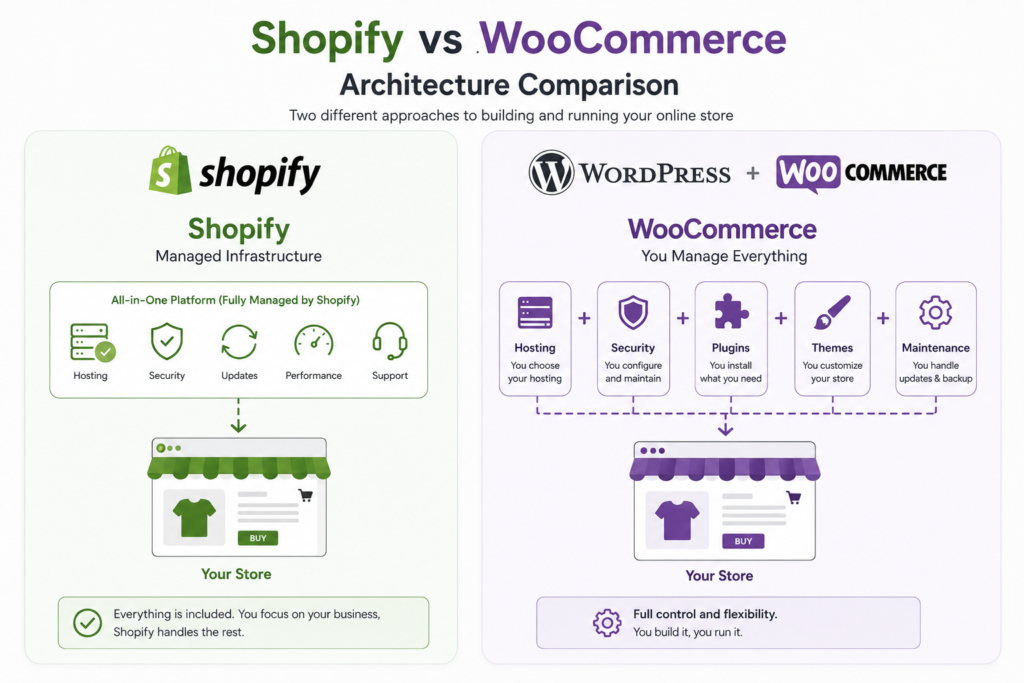
Shopify is a managed e-commerce platform.
That means Shopify provides much of the infrastructure required to operate an online store, while you manage your products, orders, customers, storefront, and business operations through the platform.
WooCommerce, on the other hand, is an open-source e-commerce solution that runs on WordPress.
This means you’re working within the WordPress ecosystem and managing additional components such as hosting, themes, plugins, updates, security, and customization.
That’s an important distinction:
Shopify
Managed Commerce Platform
WooCommerce
WordPress + E-commerce
And that difference affects almost everything else in the comparison.
What Makes Shopify Different?
Shopify was built specifically around e-commerce.
That means many of the functions you need to operate an online store are already available within the platform or can be added through Shopify’s ecosystem.
You can use Shopify to:
- Add products.
- Manage inventory.
- Manage orders.
- Manage customers.
- Build storefront pages.
- Manage sales.
- Add apps.
- Sell through multiple channels.
- Manage different aspects of the store from one dashboard.
If you want to understand Shopify in more detail first, you can read our Shopify Guide 2026 after this article.
What Makes WooCommerce Different?
WooCommerce runs on WordPress.
This means you benefit from the larger WordPress ecosystem, particularly if your website isn’t simply an online store but also relies heavily on content, blogging, landing pages, SEO, and other WordPress functionality.
WooCommerce can be used for:
- Products.
- Orders.
- Inventory.
- Customers.
- Payments.
- Shipping.
- Coupons.
- Product variations.
- Extensions.
- Custom development.
One of its biggest strengths is the amount of control you can have over the website and its environment.
But that flexibility also comes with more technical responsibility.
Shopify vs WooCommerce: Which Is Easier?
If your priority is:
“I want to launch an online store with as little technical complexity as possible.”
Shopify will often be the simpler starting point.
A significant part of the underlying infrastructure is managed by Shopify.
With WooCommerce, you’re working with WordPress, hosting, plugins, updates, security, and other technical components.
That doesn’t mean WooCommerce is difficult.
The main difference is:
Shopify = Managed
while
WooCommerce = More Control + More Responsibility
Which Platform Is More Flexible?
This is where WooCommerce has a major advantage.
Because it runs on WordPress, you have extensive opportunities for customization through:
- Themes.
- Plugins.
- Custom code.
- APIs.
- Database access.
- Custom development.
You can modify many parts of the website according to your requirements.
But Shopify doesn’t mean:
“You can’t customize it.”
That’s not true.
Shopify also supports:
- Custom themes.
- Custom sections.
- Apps.
- APIs.
- Integrations.
- Advanced storefront development.
So the real question isn’t:
“Which one can be customized?”
Both can.
The better question is:
“How much customization does my business actually need?”
Shopify vs WooCommerce Pricing
This is one of the areas where businesses often get confused.
You might hear:
“WooCommerce is free.”
But that doesn’t mean operating a WooCommerce store is free.
With WooCommerce, you may have:
Hosting
Domain
Theme
Plugins
Development
Security
Maintenance
Payment Fees
With Shopify, you may have:
Shopify Subscription
Development / Design
Apps
Domain
Payment Fees
Marketing
Maintenance / Development
So you shouldn’t compare:
Shopify Subscription
against
WooCommerce Plugin
and immediately decide which one is cheaper.
You need to compare the Total Cost of Ownership.
In other words:
How much will it actually cost to build, operate, maintain, and grow the store over time?
If you want to understand the different factors that affect website development costs, you can also read our guide to website development cost.
Which Is Better for SEO?
Both platforms can be optimized effectively for SEO.
But the platform itself isn’t what gets your store ranking.
In both cases, you need:
- Keyword Research.
- Technical SEO.
- Optimized product pages.
- Category structure.
- Internal linking.
- Content.
- Image optimization.
- Structured data.
- Performance optimization.
- Backlinks where appropriate.
- Conversion optimization.
WooCommerce
Can be a strong option when content, blogging, and SEO are central parts of the business, particularly because of its integration with WordPress.
Shopify
Can also support strong SEO, especially for businesses that want a managed commerce platform.
The important principle is:
SEO Strategy > Platform
Which Is Better for Large Online Stores?
The answer isn’t automatically:
Shopify.
Or:
WooCommerce.
Because “large store” can mean very different things.
Do you have:
- Thousands of products?
- Thousands of orders?
- Multiple countries?
- Multiple currencies?
- B2B customers?
- Wholesale operations?
- ERP integration?
- CRM integration?
- Warehouse management?
- Custom pricing?
- Complex checkout requirements?
- Multiple user roles?
Each of these requirements can affect the technology decision.
That’s why the size of the store alone isn’t enough.
Shopify vs WooCommerce for Customization
If your project requires extensive customization, WooCommerce gives you significant flexibility because of the nature of WordPress and the amount of control available across the website environment.
But Shopify also supports advanced custom development.
For example:
- Custom themes.
- Custom sections.
- Custom apps.
- APIs.
- Integrations.
- Advanced storefronts.
So it’s not accurate to say:
WooCommerce = Custom
and
Shopify = Ready-Made
Both platforms can be customized.
The difference is how that customization works and how far you need to take it.
What About Hosting?
This is another major difference.
Shopify
You use infrastructure managed by Shopify.
This reduces many of the responsibilities associated with servers and infrastructure.
WooCommerce
WooCommerce runs on WordPress, so you or your technical team are responsible for choosing and managing appropriate hosting, along with areas such as:
- Performance.
- Backups.
- Security.
- Updates.
- Server configuration.
This isn’t necessarily a disadvantage.
If you need more control, it can actually be a major advantage.
But you need to understand the trade-off:
More Control = More Responsibility
Which Is Better for Security?
Both platforms can be highly secure when implemented and maintained properly.
The difference is in how security is managed.
With Shopify, a significant portion of the underlying infrastructure is managed by Shopify.
With WooCommerce, security depends more heavily on your hosting environment, plugins, themes, WordPress updates, configurations, and access controls.
That means WooCommerce stores need careful attention to:
- Plugin updates.
- Theme updates.
- WordPress updates.
- Backups.
- Security.
- Hosting.
- Access control.
This is one reason ongoing maintenance isn’t optional for serious e-commerce businesses.
Which Is Better for Integrations?
Both platforms support integrations.
But your project’s requirements should determine which one makes more sense.
You might need:
- CRM.
- ERP.
- Payment Gateway.
- Shipping.
- Accounting.
- Marketing Automation.
- Inventory Management.
- WhatsApp.
- Mobile App.
Sometimes an existing integration can solve the problem.
In other cases, you’ll need:
Custom Integration
And that’s when you should evaluate the APIs, data flow, business logic, and technical requirements before choosing the platform.
What About Apps and Plugins?
Shopify has:
Apps
WooCommerce and WordPress have:
Plugins + Extensions
Both ecosystems are large.
But the problem isn’t the number of apps or plugins available.
The problem starts when you try to solve everything with an additional extension.
You may end up adding:
“One plugin for every feature.”
Or:
“One app for every requirement.”
Over time, that can increase:
- Cost.
- Complexity.
- Dependencies.
- Compatibility issues.
- Performance problems.
- Maintenance requirements.
That’s why:
Use fewer, better tools.
Not:
Install everything available.
Shopify vs WooCommerce in Egypt
If you’re operating in Egypt, there’s an especially important area to consider:
Payments + Shipping + Local Business Requirements
Before choosing a platform, ask:
- Which payment gateway will I use?
- Is it compatible with the platform?
- Does shipping work the way I need?
- Do I need Cash on Delivery?
- Do I need invoice integration?
- Do I need an ERP?
- Do I need a CRM?
- Does the store need Arabic?
- Does it need English?
- Do I need multiple currencies?
- Will I sell outside Egypt?
Don’t choose a platform simply because it’s popular globally.
Choose it based on the actual workflow of your business.
When Is Shopify the Better Choice?
Shopify can be an excellent choice if:
- You want a managed e-commerce platform.
- You want less responsibility for infrastructure.
- You want a relatively fast launch.
- Your business requirements are clear.
- You don’t have highly complex custom business logic.
- Your required integrations are available.
- Your business model fits the platform.
In this situation, Shopify can save significant time and technical effort.
When Is WooCommerce the Better Choice?
WooCommerce may be a better fit if:
- You already use WordPress.
- Content is a major part of your business.
- You need extensive flexibility.
- You have custom requirements.
- You want greater control over the website environment.
- You have a team or partner capable of managing WordPress and hosting.
- You need deep integration between content and commerce.
What If Neither Shopify nor WooCommerce Is the Right Choice?
This is a question many businesses forget to ask.
Sometimes the project actually needs:
Custom Development
instead of trying to force Shopify or WooCommerce to do something they’re not designed to handle.
For example, you may have:
- A complex marketplace.
- Highly specialized business logic.
- An internal business system.
- Unusual workflows.
- Complex user roles.
- A custom pricing engine.
- Extensive integrations.
- A mobile app connected to the platform.
- An advanced management dashboard.
In these cases, you should conduct a technical assessment.
The result might be:
Shopify
or
WooCommerce
or
Custom Development
or even:
A Hybrid Architecture
That’s why at CraftPress, we don’t start with:
“We build Shopify stores.”
or:
“We’re a WordPress agency.”
We start with:
“What does your business actually need?”
So, Which One Is Actually Better?
Here’s the simplest way to think about it:
Choose Shopify if:
You want a managed e-commerce platform and your requirements fit Shopify.
Choose WooCommerce if:
You need WordPress + E-commerce with greater control and flexibility over your website environment.
Consider Custom Development if:
You have complex business logic, integrations, or workflows that don’t fit well within a standard platform.
The Most Important Question Before Choosing a Platform
Instead of asking:
“Is Shopify better than WooCommerce?”
ask:
“What does my online store actually need?”
Technology selection isn’t a competition.
If Shopify meets all of your requirements, it can be an excellent choice.
If WooCommerce handles them better, use WooCommerce.
And if neither platform is appropriate, don’t force the project onto either one.
Choose a custom solution.
The goal isn’t to use the most popular technology.
The goal is to build a commerce system that supports the business.
Shopify vs WooCommerce Checklist
Before making your decision, answer these questions.
Business
☐ What type of products do you sell?
☐ Who are your customers?
☐ B2B or B2C?
☐ Egypt only or international?
Products
☐ How many products?
☐ Product variations?
☐ Digital products?
☐ Subscriptions?
☐ Wholesale?
Operations
☐ Inventory system?
☐ ERP?
☐ CRM?
☐ Warehouse?
Payments
☐ Payment gateway?
☐ Cash on Delivery?
☐ Multiple currencies?
Shipping
☐ Shipping providers?
☐ Multiple shipping methods?
☐ International shipping?
Technology
☐ Managed platform?
☐ WordPress ecosystem?
☐ Custom development?
Growth
☐ Multiple languages?
☐ International markets?
☐ Mobile app?
☐ Future integrations?
The clearer your answers are, the easier your technology decision becomes.
Conclusion
Shopify and WooCommerce are both powerful e-commerce solutions.
But neither one is automatically better for every business.
Shopify can be an excellent option when you need:
Managed Commerce
with less infrastructure responsibility and a relatively straightforward launch.
WooCommerce can be a strong choice when you need:
WordPress + Commerce
with greater flexibility and control over the website environment.
And if your project has highly specialized requirements, you may need:
Custom Development
The most important thing is:
Don’t choose the platform before understanding the project.
Define:
Business Goals
↓
Customer Journey
↓
Features
↓
Integrations
↓
SEO
↓
Operations
↓
Growth Plans
↓
Technology
Then choose.
Because the best platform isn’t necessarily the one with the most stores.
The best platform is the one that supports your business without creating unnecessary complexity.
If you’re unsure whether Shopify, WooCommerce, or Custom Development is right for your business, talk to CraftPress and let’s start with your business requirements instead of starting with a platform name.
Frequently Asked Questions
Is Shopify better than WooCommerce?
Not universally. Shopify can be a strong choice for businesses that want a managed e-commerce platform, while WooCommerce may be better for businesses that need WordPress and greater control over their website environment.
Is WooCommerce free?
WooCommerce itself is open-source, but running a WooCommerce store still involves costs such as hosting, domain registration, development, extensions, security, and maintenance.
Is Shopify easier than WooCommerce?
Shopify is generally simpler when it comes to infrastructure management because it’s a managed platform. WooCommerce gives you more control, but that also means more technical responsibilities.
Which is better for SEO?
Both platforms can be optimized effectively for SEO. Results depend on technical SEO, content, site structure, internal linking, performance, and overall SEO strategy—not simply the platform.
Which is better for online stores in Egypt?
There isn’t one universal answer. You should evaluate payment gateways, shipping, integrations, currencies, business requirements, and your specific operating model before choosing.
Is WooCommerce better if I need customization?
WooCommerce provides extensive flexibility, but Shopify also supports advanced customization. The right choice depends on the type and level of customization your project requires.
When should I choose Custom Development instead of Shopify or WooCommerce?
Custom Development may make sense when you have highly complex business logic, specialized integrations, marketplaces, internal systems, or workflows that standard e-commerce platforms cannot handle efficiently.
Can I migrate from Shopify to WooCommerce or vice versa?
Yes. Migrations between platforms are possible, but they require careful planning for products, customers, orders, URLs, SEO, and other data to minimize disruption.
Not sure whether to choose Shopify or WooCommerce?
Don’t start with the platform name.
Start with your business requirements.
CraftPress can help you choose the right technology and build an e-commerce store around your business model, integrations, and growth goals.