If you’ve decided to build a new website for your business, the first thing you may do is start looking for a web development company.
You open Google.
You compare agencies.
You look at portfolios.
And eventually you ask:
“How much will the website cost?”
But there’s another important question that many businesses overlook:
“Are we actually ready to start the website project?”
Website development isn’t simply about choosing a nice design, adding some images, and publishing your contact information.
The clearer your project requirements are from the beginning, the easier it becomes for your development company to understand the business, choose the right technology, define the scope, and build a website that actually supports your goals.
Without clear requirements, a project can quickly turn into:
“Can we add this?”
Then:
“Can we integrate that?”
Then:
“We actually need a dashboard.”
And eventually:
“Can we change how the booking system works?”
A project that was supposed to be straightforward can suddenly become more expensive, more complicated, and take much longer than expected.
That’s why, before starting a new website, you should understand what needs to be defined from the beginning—and what your development partner should help you determine.
First, Define the Goal of the Website
The most important question isn’t:
“What should the website look like?”
It’s:
“What should the website achieve for the business?”
A consulting company’s website isn’t the same as an e-commerce store.
A doctor’s website isn’t the same as an educational platform.
A manufacturing company’s website isn’t the same as a restaurant website.
And a real estate website isn’t the same as a SaaS platform.
Start by defining the primary objective.
Is the website supposed to:
- Present the company?
- Showcase services?
- Generate leads?
- Sell products?
- Accept bookings?
- Register users?
- Sell courses?
- Showcase properties?
- Receive inquiries?
- Build brand presence?
- Connect different systems?
- Provide an internal business system?
You can have multiple objectives, but you should still have a clear priority.
The objective will influence:
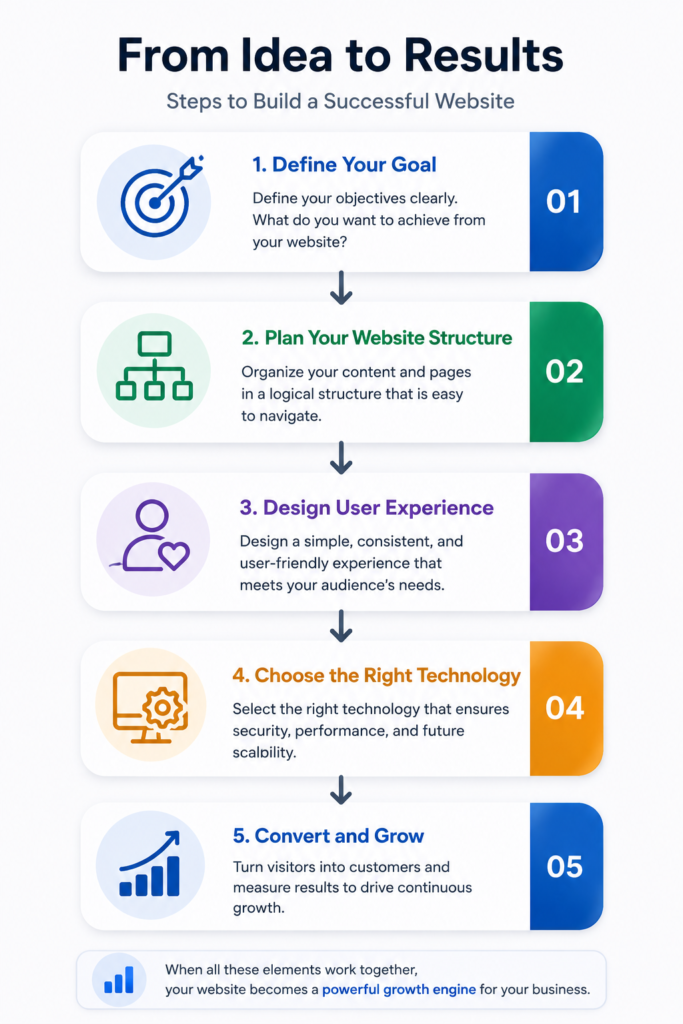
Structure → UX → Content → Technology → Features → CTA
1. Who Is the Website Actually For?
One of the biggest mistakes businesses make is building a website while thinking primarily about:
“What do I want the website to look like?”
The website needs to work for your target customers, not just the business owner.
Define:
- Who are your customers?
- Are they individuals or businesses?
- Are you B2B or B2C?
- Are they local or international?
- What problems are they trying to solve?
- What influences their buying decision?
- What questions do they usually ask?
- What objections could prevent them from contacting you?
For example, a software company’s B2B website speaks to a very different audience from an online store.
A B2B buyer may care about:
- Features.
- Integrations.
- Security.
- Pricing.
- Demo requests.
- Support.
An e-commerce customer may care more about:
- Product.
- Price.
- Shipping.
- Payment.
- Reviews.
- Returns.
Your audience influences a major part of the website experience.
2. What Pages Do You Need?
Before starting the design, create an initial sitemap.
It doesn’t have to be 100% final.
But you should have a basic structure.
A corporate website might include:
- Home
- About
- Services
- Individual Service Pages
- Projects
- Blog
- Contact
An e-commerce project might instead require:
- Products
- Categories
- Product Details
- Cart
- Checkout
- My Account
- Wishlist
An educational platform might need:
- Courses
- Instructors
- Lessons
- Student Dashboard
- Exams
- Certificates
This highlights an important point:
A website isn’t a fixed template.
The Information Architecture should be built around the business.
3. What Functionality Does the Website Need?
This is one of the most important things to define before development.
List the functionality you expect users to need.
For example:
- Contact Forms.
- WhatsApp.
- Search.
- Filters.
- User Registration.
- Login.
- User Dashboard.
- Booking.
- Online Payments.
- Subscriptions.
- Product Management.
- Course Management.
- Notifications.
- Reviews.
- Reports.
- Multiple Languages.
- Multiple User Roles.
Some requirements may be much more complex.
For example:
“A customer registers → makes a payment → books an appointment → receives confirmation → the information is recorded in the CRM.”
That’s no longer just a design requirement.
It’s a:
Workflow + Integration + Automation
And it needs to be considered early in the project.
4. Does the Website Need to Connect With Other Systems?
This is something many businesses discover too late.
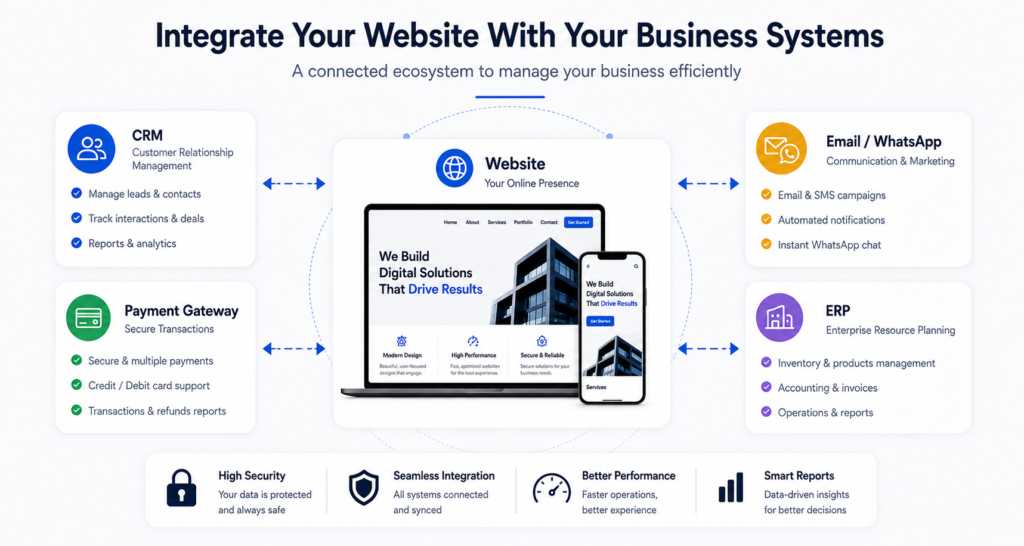
Your website may need to connect with:
- CRM.
- ERP.
- Payment Gateway.
- Accounting System.
- Booking System.
- Email Marketing Platform.
- WhatsApp.
- Shipping Provider.
- Inventory System.
- Google Services.
- Mobile App.
For example, if your company already uses a CRM, the new website shouldn’t be designed in isolation.
You need to ask:
“How will data move between the website and the CRM?”
Will a customer submit a form?
↓
Will the information go into the CRM?
↓
Will the sales team receive the lead?
↓
Will the customer receive an email or WhatsApp confirmation?
That’s architecture—not just design.
5. Do You Have the Content Ready?
This is one of the most common problems in website projects.
The development company starts designing.
Then, after the design is almost finished, the client says:
“Wait, we haven’t written the content yet.”
The content gets delayed.
Then the design changes.
Then sections change.
And the entire project gets delayed.
That’s why you should define from the beginning:
- Company Description.
- Services.
- Service Details.
- About Us.
- Team.
- Contact Information.
- FAQs.
- Product Information.
- Images.
- Videos.
- Case Studies.
The content doesn’t necessarily need to be 100% final on day one.
But you should know:
Who is responsible for creating it?
Is it:
- The client?
- The development company?
- A Copywriter?
- The Marketing team?
6. Prepare Your Visual Assets
A website isn’t just text.
You may need:
- Logo.
- Brand Guidelines.
- Product Photos.
- Team Photos.
- Project Photos.
- Videos.
- Illustrations.
- Icons.
If you’re a real estate company, high-quality property photography may be a major part of conversion.
If you’re a manufacturer, real factory and product photography may be more valuable than generic stock images.
If you’re a B2B company, case studies and project screenshots may be more useful than generic photos of people shaking hands.
So don’t rely on:
Stock Images for everything.
The more original and relevant visual assets you have, the more authentic and differentiated your website can become.
7. Do You Have a Clear Brand Identity?
If you already have:
- Logo.
- Colors.
- Fonts.
- Brand Guidelines.
- Photography Style.
- Tone of Voice.
Share them with the development team.
If you don’t have a complete brand identity, that doesn’t mean the website project has to stop.
But you need to determine:
“Are we designing the website around an existing identity?”
Or:
“Do we need to establish a visual direction for the website?”
This matters because a professional website isn’t simply a template with different colors.
8. Choose the Technology Based on Requirements
This is extremely important.
Don’t start the project by deciding:
“It has to be WordPress.”
Or:
“It has to be custom.”
Or:
“Every online store should use Shopify.”
Technology should be selected based on the project.
WordPress may be an excellent choice for a corporate website.
WooCommerce may be appropriate for an online store.
Shopify may be the better option in certain e-commerce scenarios.
Another project may require Custom Development.
And some projects may require several technologies working together.
That’s why choosing the right technology for the project should come after understanding the requirements—not before.
9. Define Your Budget Range
You don’t need to know the exact final price before speaking with a development company.
But having an approximate budget range is extremely useful.
There’s a major difference between:
A simple corporate website
and
An e-commerce platform
and
A custom web application.
Budget doesn’t simply determine the appearance of the website.
It can influence:
- Technology.
- Features.
- Design.
- Integrations.
- Content.
- Timeline.
- Maintenance.
If you want to understand the factors that influence website pricing, read How Much Does Website Design Cost?.
10. Define the Real Deadline
You may say:
“I need the website next week.”
But the real question is:
Why?
Is there:
- A launch?
- A marketing campaign?
- An event?
- A product release?
- A business deadline?
If there is a real deadline, tell the development company from the beginning.
But be realistic.
A project involving:
- 30 pages.
- E-commerce.
- Payment integration.
- Custom dashboard.
- Multiple languages.
can’t realistically be expected to launch in a few days without potentially affecting quality.
11. Think About SEO From Day One
This is extremely important.
SEO shouldn’t be something you add after the website is finished.
The website’s structure itself can affect SEO.
Before development, think about:
- Website Structure.
- URL Structure.
- Service Pages.
- Category Pages.
- Blog.
- Internal Linking.
- Metadata.
- Headings.
- Image Optimization.
- Schema.
- Redirects if you have an existing website.
Google explains that organizing a website logically and using clear links between pages helps search engines understand the site’s structure and the relationships between pages.
So if SEO is expected to become a major source of leads, your SEO strategy should influence the website architecture from the beginning.
📷 Image Placement
Image idea: Website Architecture:
Home
├── Services
│ ├── Service 1
│ ├── Service 2
│ └── Service 3
├── Projects
└── Blog
With internal links connecting related pages.
Alt Text:SEO-friendly website structure with services projects and blog pages
Suggested file name:seo-friendly-website-structure.webp
12. Define Your Conversion Actions
If the website’s goal is lead generation, you need to define:
What exactly counts as a conversion?
Is it:
- Contact Form?
- WhatsApp Click?
- Phone Call?
- Quote Request?
- Booking?
- Consultation Request?
Don’t simply say:
“I want the website to generate customers.”
Define:
“What action represents a lead for us?”
Then the UX, CTAs, and tracking can be designed around that action.
13. Think About Analytics and Tracking From the Beginning
If the website will be part of your marketing and lead-generation strategy, tracking should be considered from the beginning.
For example:
- Google Analytics.
- Google Tag Manager.
- Search Console.
- Conversion Tracking.
- Form Tracking.
- Phone Click Tracking.
- WhatsApp Click Tracking.
The goal isn’t to collect as much data as possible.
The goal is to understand:
Where did the visitor come from, and what did they do?
After launch, this data can help you identify what needs improvement.
14. Will the Website Be Available in Arabic and English?
If you’re targeting both Arabic and English audiences, define this from the beginning.
A multilingual website isn’t simply:
“We’ll translate the text.”
You also need to consider:
- URL Structure.
- SEO for each language.
- Navigation.
- Metadata.
- Internal Links.
- Content.
- RTL / LTR.
- Images and text.
- Forms.
If the project is multilingual, the architecture should account for that from the beginning.
15. Who Will Manage the Website After Launch?
Ask:
“Who will actually use the website after it goes live?”
Will your team be able to:
- Add pages?
- Edit content?
- Add products?
- Publish articles?
- Manage orders?
- Manage users?
Or will every change require the development company?
If your website needs frequent content or operational updates, the CMS and technology should match the way your team works.
16. Maintenance and Support Are Not Secondary
The project doesn’t necessarily end when the website goes live.
You may need:
- Updates.
- Security monitoring.
- Backups.
- Performance optimization.
- Bug fixes.
- Technical support.
- Content changes.
- Future development.
So before signing a contract, ask:
“What happens after launch?”
Is there:
- A Maintenance Plan?
- Technical Support?
- SLA?
- Backups?
- Security Monitoring?
- Emergency Support?
Not every project needs the same level of support.
But the expectations should be clear.
17. Prepare the Questions You Will Ask the Development Company
Before choosing a company, ask:
Do you understand the business goal?
Not just:
“We need a website.”
But:
“What is the website supposed to achieve?”
Why are you recommending this technology?
Not:
“We always use WordPress.”
But:
“Why is WordPress appropriate for this particular project?”
Who is responsible for the content?
Who is responsible for SEO?
Who is responsible for the visual assets?
Will analytics and tracking be implemented?
What is included in the price?
What isn’t included?
What happens after launch?
What maintenance options are available?
These questions can prevent many problems later.
Website Requirements Checklist
Before starting your project, make sure you’ve considered:
Business
☐ Website objective
☐ Target audience
☐ Services / products
☐ Primary conversion
Content
☐ Website copy
☐ Images
☐ Videos
☐ FAQs
☐ Case studies
Structure
☐ Sitemap
☐ Navigation
☐ Service pages
☐ Blog
☐ Landing pages
Functionality
☐ Forms
☐ Payments
☐ Booking
☐ User accounts
☐ Dashboard
☐ Search
☐ Filters
Technology
☐ CMS
☐ E-commerce platform
☐ Custom development
☐ Integrations
Marketing
☐ SEO
☐ Analytics
☐ Google Tag Manager
☐ Search Console
☐ Conversion tracking
Launch
☐ Domain
☐ Hosting
☐ SSL
☐ Backup
☐ Testing
☐ Mobile QA
After Launch
☐ Maintenance
☐ Support
☐ Security
☐ Updates
☐ Future development
Most Importantly: You Don’t Need to Know All the Answers
This is an important point.
This checklist doesn’t mean that a business owner needs to become a developer.
You aren’t expected to know:
WordPress or Laravel?
Or:
REST API or GraphQL?
Or:
Which architecture is technically best?
That’s what your technology partner should help you determine.
You should understand:
Business Goal
and
Customer
and
Business Requirements
and
Budget
and
Expected Outcome
The technology and implementation decisions should then be based on those requirements.
The Biggest Mistake: Starting With the Design
Sometimes clients begin with:
“I want this Hero Section.”
“I want this animation here.”
“I want this color.”
But they haven’t defined:
- What the business sells.
- Who the website is for.
- What the goal is.
- What the conversion is.
- What functionality is required.
- Which systems need to be connected.
This turns design into the starting point instead of the result of understanding the project.
A better process is:
Business Strategy
↓
Requirements
↓
Information Architecture
↓
UX
↓
Technology
↓
UI Design
↓
Development
↓
Testing
↓
Launch
↓
Optimization
Final Takeaway
Before starting a new website, don’t start with the design.
Start by understanding the project.
Define:
Your goal.
Your audience.
Your pages.
Your functionality.
Your integrations.
Your content.
Your SEO requirements.
Your conversions.
Your budget.
Your timeline.
And the right technology.
You don’t have to determine every technical detail yourself.
But you do need to choose a development company that can translate your business requirements into a clear, practical, and scalable digital solution.
That’s the difference between buying a:
Website
and building a:
Digital solution that supports the business.
If you’re preparing for a new website and don’t know where to start, talk to CraftPress and start with your requirements and business objectives before choosing the design or technology.
Frequently Asked Questions
What is the most important thing to define before designing a website?
The most important thing is the website’s business objective and the outcome you expect from it. Is the goal lead generation, sales, bookings, content, service presentation, or a specific business system? The objective influences the rest of the project.
Do I need to write all my website content before development starts?
Not necessarily. However, you should know what content is required and who is responsible for creating it because content affects the website structure and design.
Do I need to choose WordPress or Shopify before contacting a web development company?
No. It’s better to define your project requirements first and then let the development team recommend the technology that best fits those requirements.
Should SEO be done after the website launches?
It’s better to plan for SEO from the beginning, especially the website structure, URLs, content, internal linking, and technical foundation. Fixing everything after launch can be more difficult.
Does my website need Google Analytics and Google Tag Manager?
If the website is part of your marketing or lead-generation strategy, proper analytics and tracking can help you understand where visitors come from, what they do, and which actions generate leads.
Who should write the website content?
It can be the client, a copywriter, marketing team, or development company depending on the project and agreement. The important thing is to define responsibility before development begins.
Does a website need maintenance after launch?
Most websites need some level of maintenance, updates, backups, security, and technical support. The appropriate level depends on the technology and complexity of the project.
How can I tell whether a web development company actually understands my project?
Ask about the business objective, requirements, recommended technology, integrations, tracking, project scope, and post-launch support. If the conversation focuses only on design and price, you should probably ask more questions.
Planning a new website but don’t know where to start?
Before choosing a template, technology, or visual style, let’s understand your business requirements first.
CraftPress helps turn your business requirements into a website or digital solution that fits your goals, audience, and stage of growth.