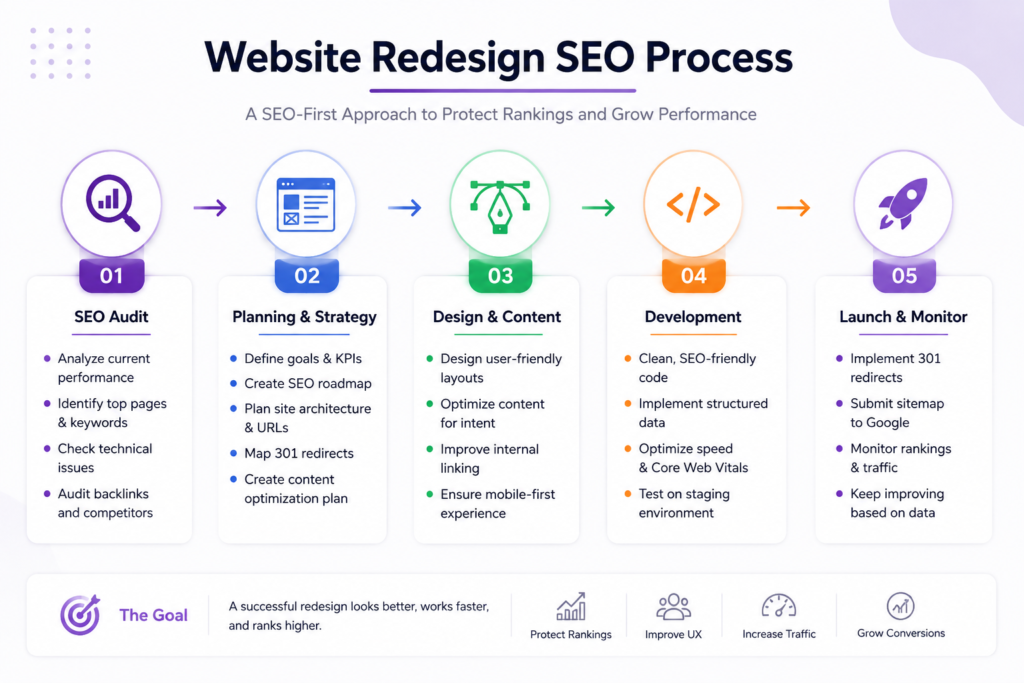
Redesigning your company website can be one of the best decisions you make for your business but if you make a website redesign without losing SEO
A better structure can improve user experience. A stronger design can make your brand look more credible. Better performance can make the website easier to use. And a clearer conversion path can help turn more visitors into leads.
But there is one thing you should never forget:
Your existing website has already built SEO value.
Over time, some of your pages may have earned Google rankings, organic traffic, backlinks, internal links, and even leads.
So if you redesign the website without considering SEO, you could end up with a better-looking website that performs worse in search.
That does not mean website redesigns are bad for SEO.
It means SEO needs to be part of the redesign process from the beginning.
Google recommends preparing the new site carefully, creating a URL mapping, configuring redirects, testing the new site, and monitoring traffic and indexing after the move. Google also notes that temporary ranking fluctuations can happen while the new URLs are crawled and reindexed.
In this guide, we’ll walk through what you should do before, during, and after a website redesign to protect the SEO value you’ve already built.
Can a Website Redesign Hurt SEO?
Yes, it can.
But the redesign itself isn’t the problem.
The problem is changing important SEO elements without knowing what you’re changing.
For example, imagine your website currently has:
/services/web-design/
That page ranks for relevant searches and receives organic traffic.
During the redesign, someone changes it to:
/services/website-development/
That’s not necessarily a bad change.
The problem starts when the old URL disappears without a proper transition to the new one.
The same thing can happen when you:
- Delete important pages.
- Change URLs without redirects.
- Remove useful content.
- Change the website structure.
- Break internal links.
- Accidentally add
noindex. - Misconfigure canonical URLs.
- Launch a new sitemap containing the wrong URLs.
- Forget to test the website before launch.
Google recommends creating a URL mapping between the old and new URLs and setting up appropriate redirects when URLs change.
So the goal isn’t:
“Never change anything.”
The goal is:
“Know what you’re changing, why you’re changing it, and how the SEO signals will move with it.”
1. Start With an SEO Audit Before You Redesign
One of the biggest mistakes is starting the design before understanding what already works.
Before changing the website, you need a baseline.
Review things such as:
- Organic traffic.
- Search queries.
- Important rankings.
- Indexed pages.
- Pages generating leads.
- Backlinks.
- Existing URLs.
- Internal links.
- Technical SEO issues.
- Important landing pages.
The reason is simple:
You can’t protect SEO value that you haven’t identified.
A page might not look important from a design perspective but could be one of the most valuable pages on the website from a search perspective.
A practical approach
Create a list called:
SEO Assets to Preserve
Include:
- High-value pages.
- Pages receiving organic traffic.
- Pages ranking for important queries.
- Pages generating leads.
- Pages with valuable backlinks.
- Important category and service pages.
This list becomes one of the inputs for the redesign project.
2. Identify Which Pages Actually Generate Organic Traffic
Not every page on your website has the same value.
You might have 60 pages, but perhaps only 15 receive most of your organic traffic.
And even that isn’t the whole story.
A page receiving 100 visitors a month could be more valuable than a page receiving 1,000 visitors if those 100 visitors are much more likely to become customers.
So review both:
SEO value
and
Business value.
Look at:
- Clicks.
- Impressions.
- Search queries.
- Rankings.
- Leads.
- Conversions.
- Revenue or business relevance.
Then categorize pages:
High Value → Medium Value → Low Value
Before deleting or merging anything, ask:
“What happens to the SEO and business value of this page if we remove it?”
3. Create a Complete List of Your Old URLs
This is one of the most important steps when the redesign will change your website structure.
Don’t rely only on the pages visible in your navigation.
Your website may contain valuable URLs that aren’t linked from the main menu.
Check URLs from sources such as:
- XML sitemap.
- Google Search Console.
- Analytics.
- Your CMS.
- A website crawler.
- Existing SEO tools.
- Server data, when available.
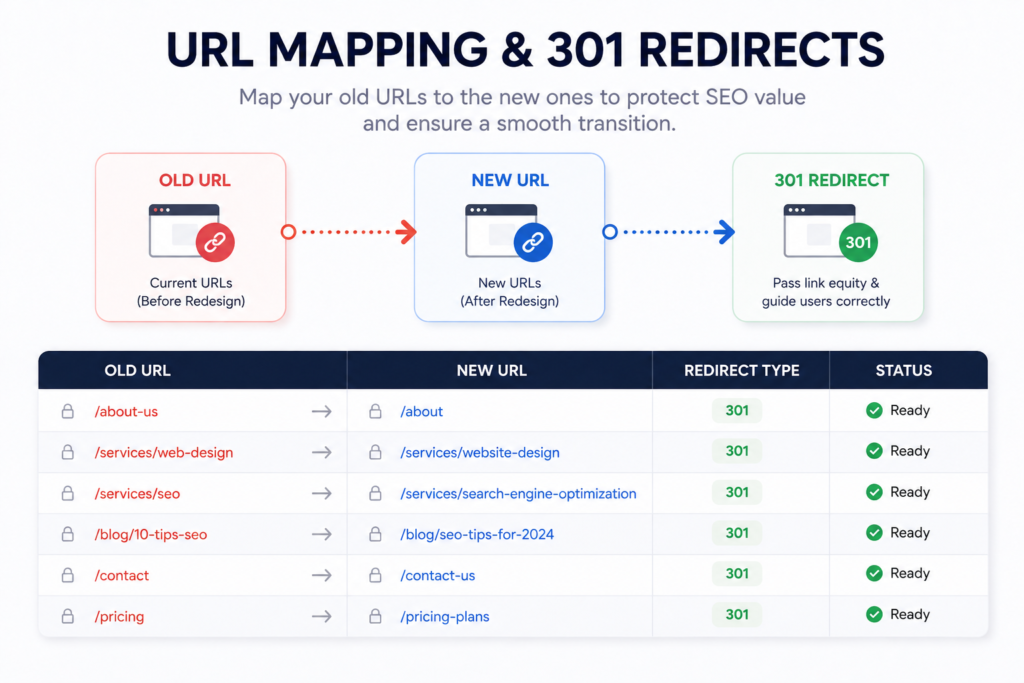
Google specifically recommends preparing a URL mapping from current URLs to their corresponding new URLs when moving or restructuring a website.
Create a spreadsheet
For example:
| Old URL | New URL | Action | Redirect |
|---|---|---|---|
/old-service/ | /services/new-service/ | Move | 301 |
/about-company/ | /about/ | Move | 301 |
/old-blog-post/ | /new-blog-post/ | Update | 301 |
/outdated-page/ | — | Remove | Review |
This spreadsheet becomes your SEO migration map.
4. Don’t Delete Important Pages Just Because They’re Old
During a redesign, you will probably find pages that look outdated.
That doesn’t automatically mean they should disappear.
Before deleting a page, ask:
- Does it receive organic traffic?
- Does it rank for useful queries?
- Does it have backlinks?
- Does it generate leads?
- Does it answer a useful search intent?
- Is it linked internally?
- Can the content be improved instead?
Sometimes the right decision is:
Update
instead of:
Delete.
A useful framework is:
Keep → Improve → Merge → Redirect → Remove
The decision should be based on evidence, not simply on whether the page looks old.
5. Build Your URL Mapping Before Launch
Once you’ve identified the old URLs, decide where each one goes.
For example:
/web-design/
could become:
/website-development/
Or:
/old-service/
could be merged into:
/services/
There isn’t one rule that says every old URL must have its own new URL.
Some URLs should remain unchanged.
Some should move.
Some should be merged.
Some genuinely need to be removed.
The important thing is that every decision is intentional.
Google’s site-migration guidance recommends preparing the URL mapping before implementing the move.
Don’t wait until launch day
The URL mapping should be part of the planning stage.
Your developer, SEO specialist, content team, and project manager should all understand it before the new website goes live.
6. Set Up 301 Redirects for Changed URLs
If an important URL changes, you need a clear plan for the old URL.
A permanent redirect such as a 301 tells users and search engines that the page has moved to a new location. Google recommends server-side permanent redirects when possible for permanent URL changes.
For example:
example.com/old-service/
↓
301 Redirect
↓
example.com/services/web-development/
But there’s an important rule:
Don’t redirect everything to the homepage.
If:
/web-design/
becomes:
/website-development/
then send the old URL to the relevant new page.
Don’t automatically send it to:
/
Google specifically warns against redirecting many old URLs to one irrelevant destination such as the homepage. This can confuse users and may be treated as a soft 404.
Avoid redirect chains too
You don’t want:
Old URL → URL B → URL C → Final URL
Whenever practical, aim for:
Old URL → Final URL
This keeps the migration cleaner and reduces unnecessary redirects.
7. Preserve Valuable Content
A redesign often includes content changes.
That’s normal.
But be careful about removing content simply because the new design is cleaner.
Imagine an old service page contains:
- Detailed service information.
- Important keywords.
- FAQs.
- Supporting internal links.
- Answers to customer questions.
The new design replaces all of that with:
A large image + a short headline + “Contact Us.”
Visually, the new page may look much better.
From an SEO perspective, however, you’ve potentially removed useful information.
The better approach
Before changing an important page, ask:
“Why was this page valuable?”
Then preserve that value while improving:
- Content quality.
- Structure.
- Readability.
- UX.
- Conversion.
Think:
Preserve the value → Improve the content → Improve the experience.
8. Update Internal Links After the Redesign
Redirects are not a replacement for proper internal linking.
Let’s say the old page was:
/web-design/
and the new page is:
/website-development/
If your website still contains dozens of internal links pointing to the old URL, visitors will repeatedly pass through redirects.
After the redesign, update your internal links so they point directly to the final URLs.
Google specifically recommends updating internal links after a site move.
For CraftPress, this is also where we can connect related content naturally.
For example, a relevant section about technology choices can link to:
WordPress vs. Custom Development
A section discussing project budgeting can link to:
And when the article discusses selecting a development partner, a relevant contextual link can point to:
The links should always be placed where they genuinely help the reader.
9. Check Canonical Tags, Sitemap, and Robots.txt
Technical SEO settings can easily get overlooked during a redesign.
Especially when the new website was developed on a staging environment.
A staging website may intentionally use:
noindex- Crawl restrictions
- Temporary canonical URLs
- Temporary robots rules
That’s fine during development.
The problem is when those settings accidentally remain after launch.
Google specifically recommends checking canonical annotations and robots meta rules during a site move, especially if temporary noindex rules were used during development.
Check these before launch:
robots.txtnoindex- Canonical tags
- XML sitemap
- Hreflang, if applicable
- Internal links
Canonicalization is Google’s process for choosing the representative URL when multiple URLs contain the same or very similar content. The canonical is a signal, not an absolute command, so it needs to be configured correctly.
📷 IMAGE PLACEMENT — Technical SEO
Place an original technical SEO checklist here showing:
- Canonical
- Robots.txt
- Noindex
- Sitemap
- Internal Links
- Hreflang
Suggested file name:website-redesign-technical-seo-checklist.webp
Alt Text:Technical SEO checklist for a website redesign
10. Make Sure Your New Sitemap Contains the Right URLs
If your website structure changes, your XML sitemap should be reviewed as part of the migration.
The sitemap should help Google discover the URLs you actually want indexed.
Google recommends including the canonical URLs you want to appear in search results rather than listing multiple versions of the same content.
So after the redesign, don’t blindly submit the old sitemap.
Review:
- Which URLs are still valid?
- Which URLs changed?
- Which pages were removed?
- Which URLs are canonical?
- Are there redirected URLs still listed?
- Are there accidental staging URLs?
Then submit the new sitemap through Google Search Console.
11. Test Everything Before the Website Goes Live
One of the worst approaches to a redesign is:
“The website looks good. Let’s publish it.”
A redesign needs a Pre-Launch SEO QA.
Check the URLs
Are all important pages present?
Check redirects
Do old URLs redirect to the correct new pages?
Check links
Are there broken internal links?
Check indexing
Is there any accidental noindex?
Check canonical tags
Does each important page have the correct canonical?
Check the sitemap
Does it contain the right URLs?
Check robots.txt
Can search engines crawl what they need to crawl?
Check mobile
Does the website work properly on real mobile devices?
Check performance
Did the redesign make the website heavier?
Check analytics
Are GA4, GTM, and other tracking systems still working?
Check forms
Are leads still being delivered correctly?
A beautiful redesign that stops your lead form from working is not a successful redesign.
12. Monitor Google Search Console After Launch
Launching the website isn’t the end of the migration.
It’s the beginning of the monitoring phase.
After launch, keep an eye on:
- Impressions.
- Clicks.
- Search queries.
- Average position.
- Indexed pages.
- 404 errors.
- Redirect errors.
- Sitemap status.
- Search performance.
- Organic traffic.
Google recommends using Search Console during site moves and monitoring the old and new URLs. It also notes that ranking fluctuations can happen temporarily while Google recrawls and reindexes the changed site.
Don’t panic if every ranking doesn’t look exactly the same immediately after launch.
But don’t ignore serious technical problems either.
There’s a big difference between:
temporary ranking fluctuation
and:
hundreds of important pages suddenly returning 404s.
The second one needs immediate attention.
Common SEO Mistakes During a Website Redesign
Let’s make the biggest mistakes easy to remember.
❌ Changing URLs without redirects
A valuable page disappears and the old URL becomes a 404.
❌ Deleting pages without checking their value
A page can look outdated while still generating traffic or leads.
❌ Redirecting everything to the homepage
A homepage is not a replacement for every old page.
❌ Leaving staging noindex settings active
The website launches, but search engines are still being told not to index it.
❌ Forgetting internal links
The website continues linking to old URLs even after the migration.
❌ Replacing valuable content with minimal copy
A cleaner design doesn’t necessarily mean better search relevance.
❌ Forgetting canonical tags
The new website sends confusing signals about which URL should be considered primary.
❌ Launching without a crawl
Broken links and technical issues are discovered only after Google starts crawling.
❌ Not monitoring Search Console
Problems can continue for days without anyone noticing.
Website Redesign SEO Checklist
Before the Redesign
- Complete an SEO audit
- Identify high-value pages
- Review organic traffic
- Review important rankings
- Review backlinks
- Export existing URLs
- Identify pages to keep
- Identify pages to improve
- Identify pages to merge
- Identify pages to remove
- Create URL mapping
- Review valuable content
During Development
- Preserve important content
- Prepare redirects
- Update internal-link structure
- Configure canonical tags
- Configure sitemap
- Review robots.txt
- Review hreflang if applicable
- Preserve analytics and tracking
- Test mobile experience
- Test performance
Before Launch
- Crawl the new website
- Test redirects
- Test broken links
- Check for accidental noindex
- Review canonical URLs
- Review sitemap
- Review robots.txt
- Test forms
- Test analytics
- Verify Search Console
After Launch
- Submit the new sitemap
- Request indexing for important URLs when appropriate
- Monitor Search Console
- Monitor 404 errors
- Monitor redirects
- Monitor organic traffic
- Monitor rankings
- Update internal links
- Fix technical problems quickly
Redesigning Your Website Is Not Just a Design Project
This is the most important idea to take away.
A website redesign isn’t simply:
New Colors + New Fonts + New Homepage
A successful redesign should connect:
Business Goals → User Needs → Content → Structure → UX → Design → Technology → SEO → Performance → Conversion
If you only change the visual design, you may end up with a website that looks better.
But if you use the redesign to solve real business and user problems, you can create a website that works better for the business.
That’s a much more valuable outcome.
And if you’re unsure which technology should power the new website, don’t assume you have to use the same technology as before.
For example, WordPress may be appropriate for one project, while Shopify, a dedicated LMS, or custom development may make more sense for another.
The right technology should be selected based on:
- Requirements.
- Features.
- Budget.
- Scalability.
- Integrations.
- Maintenance.
- Long-term business goals.
You can explore the different solutions CraftPress works with through its web development services.
Final Thoughts
A website redesign does not have to come at the expense of your SEO.
The real danger is redesigning without understanding what your existing website has already built.
Before the redesign, identify your valuable pages, URLs, content, rankings, traffic, and backlinks.
During development, plan the URL changes, redirects, internal links, canonical tags, sitemap, and technical setup.
Before launch, test everything.
After launch, monitor Search Console, organic traffic, rankings, indexing, redirects, and errors.
Most importantly, don’t treat the redesign as a purely visual project.
If your website is an important part of your marketing and lead-generation strategy, the project should bring together:
Business + UX + Design + Development + SEO + Performance + Conversion.
If you’re planning a redesign and aren’t sure what should stay, what should change, or whether the current technology is still right for your business, start with an assessment of the existing website before making the final decision.
Frequently Asked Questions
Can a website redesign hurt SEO?
Yes. Changing URLs, content, site structure, internal links, or technical settings without a proper migration plan can create SEO problems. A structured migration with URL mapping, appropriate redirects, testing, and monitoring can reduce the risk.
How do I redesign a website without losing SEO?
Start by identifying important pages, rankings, traffic, backlinks, and existing URLs. Then create a URL mapping, implement relevant permanent redirects, preserve valuable content, update internal links, and monitor Search Console after launch.
Should I change my URLs during a website redesign?
Not necessarily. If your existing URLs are already useful and well-established, keeping them can simplify the migration. If URLs need to change, create a clear mapping from each old URL to the most relevant new destination.
What is a 301 redirect?
A 301 is a permanent redirect that sends users and search engines from an old URL to a new location. Google recognizes permanent redirects as a signal that the destination should replace the old URL.
Should I redirect old pages to the homepage?
Usually not. If a relevant new page exists, redirect the old URL to that page. Redirecting unrelated old URLs to the homepage can create a poor user experience and may be treated as a soft 404.
Should I update my sitemap after a redesign?
Yes. If URLs change, review and update your sitemap so it contains the URLs you want Google to discover and index. Google recommends including the canonical URLs you want represented in search.
How long should I monitor SEO after a redesign?
There is no single fixed period for every website. Monitor Search Console, organic traffic, rankings, indexing, redirects, and errors closely after launch. Google notes that ranking fluctuations can occur while a site is being recrawled and reindexed.
Can I change the website technology during a redesign?
Yes, but changing the technology, structure, URLs, content, and design simultaneously increases project complexity. When possible, major changes should be planned carefully and tested rather than treated as one unstructured change. Google recommends changing one major aspect at a time where practical during site moves.
CTA
Planning a website redesign but worried about losing your SEO?
Before changing the design, technology, or URLs, make sure you understand what your current website has already built.
Share your website with CraftPress and let’s identify what should be preserved, what should be improved, and what can be rebuilt as part of the new experience.