You have a website. People are visiting it. Your pages are live. Your business is active.
But when you look at the results, you’re still asking:
“Why isn’t my website generating enough leads?”
The problem may not be your traffic.
You might have visitors coming to your website without turning into:
- Contact form submissions
- Phone calls
- WhatsApp conversations
- Quote requests
- Booking requests
- Sales opportunities
And that’s an important distinction.
Because if the problem is conversion, simply increasing traffic may not solve it.
Before spending more money on ads, publishing more content, or rebuilding your entire website, you need to understand where the problem actually is.
In this guide, we’ll look at the most common reasons websites fail to generate leads and what you should check before deciding on your next move.
1. You’re Attracting the Wrong Traffic
The first question you should ask is:
Who is actually visiting your website?
Not all traffic has the same business value.
You might be getting thousands of visitors, but if most of them aren’t potential customers, a high traffic number won’t necessarily produce more leads.
For example, a B2B company could rank for informational searches that attract people looking for general information rather than people looking to hire a service provider.
That’s why you need to look at:
- Search queries
- Landing pages
- Traffic sources
- Audience data
- Conversion data
If the traffic isn’t relevant to your business, improving the website alone won’t solve the problem.
The problem starts before the visitor even reaches your website.
2. Visitors Don’t Understand What You Offer
This is one of the most common website problems.
A visitor lands on your homepage and still has to figure out:
What does this company actually do?
Is this service right for me?
What do I get from working with them?
What should I do next?
If your value proposition isn’t clear, visitors can leave before taking any action.
This is especially important in the hero section.
Visitors should quickly understand:
What you do + Who you help + Why it matters + What to do next
You don’t need to explain your company’s entire history in the first screen.
Start with the customer’s problem and the solution you provide.
3. Your Website Doesn’t Build Enough Trust
Before contacting your company, potential customers often ask themselves:
“Can I trust this company to actually solve my problem?”
If your website doesn’t provide enough evidence, you can lose leads even when your service is good.
Useful trust elements can include:
- Previous projects
- Case studies
- Genuine testimonials
- Client reviews
- Relevant certifications
- Clear company information
- Team information
- Contact details
- Real results and examples
But there’s an important rule:
Never use fake social proof.
Trust isn’t created by adding dozens of logos to a page.
It’s created by providing credible evidence.
4. Your Calls to Action Aren’t Clear
A visitor may be interested in your service but still wonder:
“What am I supposed to do now?”
If your website is full of generic buttons such as:
Learn More
Read More
Explore
you may be missing conversion opportunities.
Your CTA should match the action you want the visitor to take.
For example:
Request a Quote
Book a Consultation
Start Your Project
Talk to Our Team
Not every button needs to say “Contact Us.”
The important thing is that the visitor understands:
What happens after I click this button?
5. Your Contact Form Is Too Complicated
Some businesses try to collect every possible piece of information before allowing a potential customer to submit a form.
The form might ask for:
- Name
- Phone
- Company
- Industry
- Budget
- Company size
- Project type
- Timeline
- Detailed message
- Several additional questions
Then the visitor looks at the form and thinks:
“Do I really need to fill all of this out?”
And leaves.
That doesn’t mean every contact form should be short.
If your sales process requires certain information to qualify leads, some fields may be valuable.
But you should always ask:
Is this field necessary at this stage?
Only collect what you actually need.
6. Your Website Is Too Slow
If your website is slow, you may lose users before they even see your CTA.
Common causes include:
- Large images
- Excessive JavaScript
- Too many plugins
- Third-party scripts
- Weak hosting
- Unoptimized CSS
- Unnecessary website elements
Website performance isn’t just a technical issue.
It’s part of:
User Experience + SEO + Conversion
If visitors have to wait for the page to load, some of them may leave before interacting with your website.
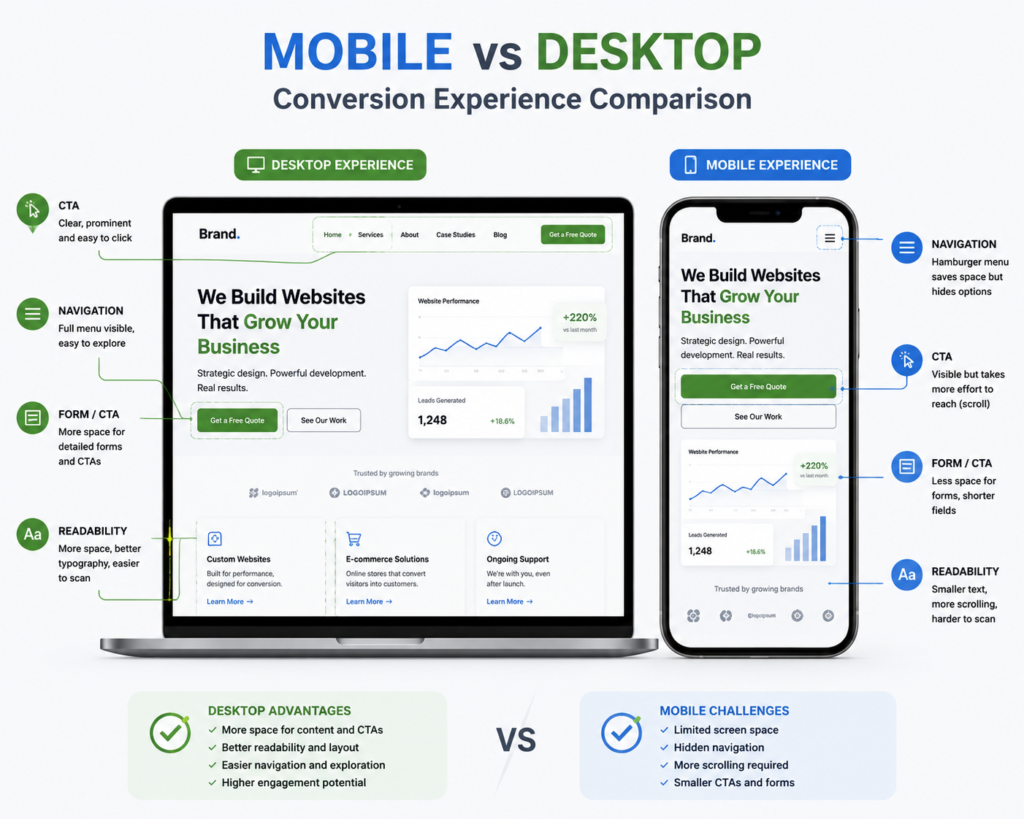
7. Your Mobile Experience Is Poor
Your website might look great on a desktop.
But what happens when someone opens it on a phone?
Check:
- Font sizes
- Buttons
- Navigation
- Forms
- Images
- Spacing
- Page speed
- Sticky elements
Your CTA is particularly important.
If someone needs to zoom in to read your content or tap a button, your mobile UX needs attention.
8. Your Navigation Is Confusing
If visitors can’t quickly find what they’re looking for, they may leave.
A service company might have:
Home
About
Services
Products
Solutions
Resources
Blog
News
Projects
Careers
Contact
But ask yourself:
Does all of this actually help the visitor make a decision?
The problem isn’t necessarily the number of pages.
It’s whether the website structure helps the visitor move toward the information and action they need.
A commercial website should guide users naturally through:
Problem
↓
Solution
↓
Proof
↓
Action
9. Your Landing Pages Aren’t Built for Conversion
You can have a great website and still have poor landing pages.
Imagine your ad says:
“Website Development for Egyptian Businesses”
But the ad sends visitors to a homepage that talks about 15 different services.
The visitor arrived with a specific intent.
You gave them everything.
The result can be:
Confusion.
A landing page should match the intent that brought the visitor there.
If someone clicks an ad for:
E-commerce Development
they should ideally land on a page focused specifically on:
- E-commerce development
- Platforms
- Features
- Process
- Relevant examples
- Benefits
- CTA
Not a generic page containing every service your company offers.
10. You’re Not Tracking Conversions Correctly
This is one of the most dangerous problems.
You may think:
“My website isn’t generating leads.”
But are you actually tracking every meaningful lead action?
For example:
- Contact form submissions
- WhatsApp clicks
- Phone clicks
- Email clicks
- Booking requests
- Quote requests
- CTA clicks
Without proper tracking, you’re making decisions based on assumptions.
You need to understand:
Who arrived?
↓
Where did they come from?
↓
What did they see?
↓
What did they click?
↓
Where did they leave?
↓
Did they convert?
↓
Was the lead qualified?
The Problem Isn’t Always the Website
This is an important distinction.
If your website isn’t generating enough leads, there are at least four possible problems:
1. Traffic Problem
The wrong people are visiting.
2. Offer Problem
Your offer isn’t clear or compelling enough.
3. Website Problem
The website isn’t converting visitors.
4. Sales Problem
The website generates leads, but your sales process isn’t converting them into customers.
That’s why you shouldn’t simply say:
“The website isn’t working.”
without looking at the data.
How Do You Find the Real Problem?
Start with the funnel:
Traffic
↓
Landing Page
↓
Engagement
↓
CTA
↓
Lead
↓
Qualified Lead
↓
Customer
Every stage has its own conversion rate.
Imagine you have:
10,000 Visitors
and
20 Leads
You may have a conversion problem.
But if you have:
100 Visitors
and
2 Leads
the bigger problem might be traffic volume.
And if you have:
100 Leads
and
2 Customers
the problem could be lead quality or your sales process.
The visible result may be the same:
“The website isn’t generating customers.”
But the underlying problem can be completely different.
📷 Image Recommendation
Idea: A visual conversion funnel:
Traffic → Engagement → CTA → Lead → Qualified Lead → Customer
Add the key metric under each stage.
Alt Text:Website conversion funnel from traffic to qualified leads and customers
Suggested file name:website-conversion-funnel.webp
11. Your SEO Is Attracting the Wrong People
SEO isn’t simply about:
“Getting to the top of Google.”
The more important question is:
“Who are you bringing to the website?”
A page can rank well for a high-volume keyword and still generate very few leads if the search intent is purely informational.
You may get traffic without getting business.
That’s why your SEO strategy needs to connect:
Keyword Intent
with
Business Intent
For example:
What is Shopify?
has less commercial intent than:
Shopify development company
And:
How much does an e-commerce website cost?
is generally closer to a buying decision than a purely educational search.
The goal isn’t simply to chase the highest search volume.
The goal is to attract people with problems your company can actually solve.
12. Your Website Doesn’t Match Your Sales Process
Your website can be well designed and still fail to support the way you sell.
For example, if your service requires a consultation before pricing, making every CTA:
Buy Now
doesn’t make sense.
If your service works best through a quote request, then:
Request a Quote
may be more appropriate.
If customers need to speak with someone first:
Talk to an Expert
might be the better action.
Your website should work as part of your sales process—not separately from it.
Do You Need a New Website?
Not necessarily.
This is extremely important.
Sometimes the problem can be solved by:
- Improving your CTA
- Rewriting website copy
- Optimizing landing pages
- Simplifying forms
- Improving mobile UX
- Improving speed
- Fixing conversion tracking
- Improving navigation
- Adding genuine trust signals
In other cases, the website may genuinely need:
A redesign
or:
A rebuild
But that decision should come from diagnosis.
Not:
“The website looks old, so let’s rebuild it.”
Website Conversion Checklist
Before deciding that your website isn’t generating enough leads, check:
☐ Is your value proposition clear?
☐ Does the visitor immediately understand what you offer?
☐ Is the CTA clear?
☐ Is your contact form easy to complete?
☐ Is the website fast?
☐ Is the mobile experience good?
☐ Is the navigation clear?
☐ Do you have genuine trust signals?
☐ Do your landing pages match search and campaign intent?
☐ Is conversion tracking configured correctly?
☐ Is your SEO attracting the right audience?
☐ Does your website support your sales process?
If you’re struggling with several of these areas, you may need more than a small design adjustment.
You may need a website conversion audit.
When Should You Get a Website Conversion Audit?
A conversion audit can make sense if:
- Your website gets traffic but very few leads.
- You receive leads but their quality is poor.
- Visitors leave quickly.
- CTA clicks are low.
- Forms aren’t being completed.
- Mobile conversion is weak.
- You don’t know what visitors are doing.
- SEO brings traffic but little business value.
- Paid ads generate visits but not leads.
In these situations, an audit can help you identify:
Where is the problem?
before spending money on a complete rebuild or increasing your advertising budget.
Conclusion
If your website isn’t generating enough leads, don’t immediately assume the solution is:
More Traffic.
And don’t automatically assume the answer is:
A New Website.
Start with diagnosis.
Ask:
Are we attracting the right audience?
↓
Is our offer clear?
↓
Does the website build trust?
↓
Is the user experience simple?
↓
Is the CTA clear?
↓
Is the website fast?
↓
Is the mobile experience good?
↓
Is conversion tracking working?
↓
Is SEO attracting buyers rather than just visitors?
↓
Does the website support our sales process?
A successful website isn’t simply the one with the most attractive design.
It’s the website that helps turn relevant visitors into real business opportunities.
If you already have a website but aren’t happy with the number of leads it’s generating, talk to CraftPress and identify the problem before assuming you need a completely new website.
Frequently Asked Questions
Why is my website not generating leads?
The problem could be your traffic, offer, user experience, CTA, website performance, tracking, or even your sales process. You need to analyze the data to identify the actual bottleneck instead of guessing.
Will getting more website traffic solve my lead-generation problem?
Not necessarily. If your existing website traffic isn’t converting, increasing traffic may simply increase the number of visitors without producing a proportional increase in leads.
How can I tell whether the problem is my website or SEO?
Look at the quality of your traffic, search intent, landing pages, and conversion rate. If the traffic is relevant but conversion is low, the website or offer may be the problem. If the traffic itself is irrelevant, your SEO strategy may need improvement.
Do I need a redesign if my website isn’t generating leads?
Not always. Improving your copy, CTAs, forms, UX, performance, and tracking may be enough. A redesign or rebuild makes more sense when the underlying problems are deeper.
What is the most important factor in website conversion?
There isn’t one single factor. Your value proposition, UX, trust signals, CTA, performance, landing pages, and tracking all need to work together.
Can a long contact form reduce conversions?
It can. Unnecessary fields can increase friction and cause visitors to abandon the form. However, the ideal number of fields depends on your business and how you qualify leads.
Does website speed affect lead generation?
Yes. Performance is an important part of the user experience. A slow website can prevent visitors from reaching your content or CTA before they take action.
What should I do first if my website isn’t generating leads?
Start by analyzing your funnel and conversion tracking to identify where visitors are dropping off. Then decide whether you need optimization, a redesign, a rebuild, or a different solution.
CTA
Your website shouldn’t just look professional. It should help generate business.
If you’re getting visitors but not enough qualified leads, don’t immediately rebuild the entire website.
CraftPress can help identify what’s stopping visitors from converting, then recommend the right solution—from conversion optimization and performance improvements to a complete redesign or rebuild when necessary.